A laptop at a boat's chart table has several jobs waiting for it: display the coast, locate the boat, and help a crew carry a planned route to another instrument. OpenCPN brings those jobs into an open-source chartplotter. Its appeal begins with being able to assemble a useful navigation workspace from charts, receivers, and computers that have separate lives.[1]
The project's download page lists stable version 5.14.2, released September 27, 2026, with options for Windows, macOS, Linux, Raspberry Pi, and Android.[2] That makes this a timely introduction to an established project. The revealing first step, however, comes before any connection to a boat: learn what each piece contributes to the screen.
The coastline is only the beginning
OpenCPN's quick-start guide divides setup into installing the application, installing charts, and connecting a position receiver.[3] Each step supplies something the others cannot. Software knows how to display information; a nautical chart supplies information about an area; a receiver supplies the boat's position.
The distinction is easy to miss on first launch. A background coastline makes a program look ready to explore, but the manual explicitly distinguishes its basemaps from navigational charts. A higher-resolution background remains a background. It does not acquire soundings or the authority of a hydrographic chart merely because the coast looks more convincing.[4]
The project supports several chart formats, including S-57 vector charts, BSB raster charts, and MBTiles.[1] These are different ways of delivering geographic material, so the next question is where the material comes from. The chart-installation guide points beginners toward Chart Downloader and also describes commercial and manual installation routes. It recommends organizing chart files in accessible directories, with subdirectories where useful for chart types or regions.[4]
For a first shore-side session, choose one familiar area and identify its chart source. Then open the chart's information box. OpenCPN exposes fields such as scale, chart identifier, depth units, edition, and update date.[7] Reading those fields is a more informative milestone than zooming until a harbor fills the screen: it establishes what you are looking at.
A receiver makes the boat appear
The next addition is a GNSS receiver—the broader category that includes GPS. OpenCPN can obtain position data through several arrangements, including serial or USB connections, Bluetooth, and supported integrated receivers. The manual treats finding the correct port as a basic part of connecting an external device.[5]
For a serial connection, Options → Connections → Add new connection is where the application is told which input to read. The baud rate must match the source. The guide gives 4,800 baud as a common NMEA 0183 setting and 38,400 for AIS transceivers, while directing users to the equipment's documentation where settings vary.[5]
This is a useful introduction to the project's practical character. A cable can be attached while the program listens to the wrong port. The NMEA debug window helps distinguish an absent data stream from a display problem; the manual describes a green satellite indicator when a valid position fix arrives.[5]
That signal answers a limited question. It establishes that position information is reaching the application. Chart quality remains a separate concern: the chart-information guide warns that even checking a raster chart's coordinate grid does not establish the accuracy of every feature drawn on it.[7]
There is already a boat around the computer
David Bishop's Yachting Monthly account gives this assembly a physical setting. Aboard Troppo Bella, a 1994 Dehler 34, he wanted to retain working instruments and fit computing into a cramped space. He used OpenPlotter, a bundle including OpenCPN and Signal K, with two Raspberry Pis inside an old Navtex enclosure.[8]
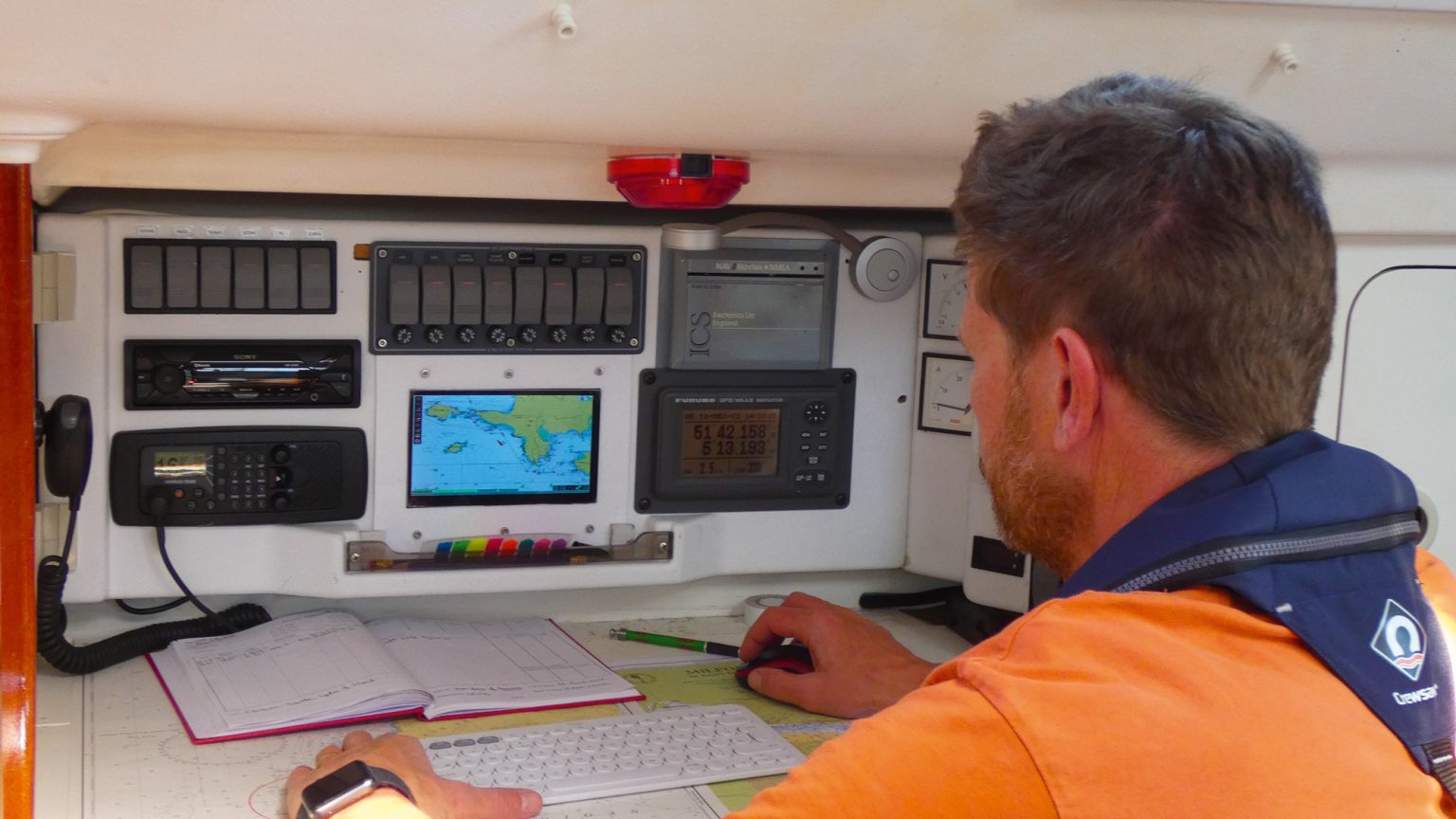
After a first sea trial in May 2022, Bishop described preparing routes in OpenCPN and transferring them to Navionics as GPX files. The existing cockpit display still had a role.[8] My reading is that the software gained value by fitting into a boat the owners already understood, with its particular space and power constraints.
A different sailor's experience reinforces that point. In Yachting World's reporting, James Frederick describes using OpenCPN on a laptop for satellite overlays while finding that particular setup unsuitable for primary use in a squall.[9] That is a judgment about his installation and conditions. It should not be mistaken for a limitation of every platform the project supports.
A route can leave the screen
OpenCPN's Route & Mark Manager can export and import navigation objects using GPX. Keeping a route in its own file makes it easier to retrieve, share, or inspect later. The manual also describes Send to Peer for transferring objects between OpenCPN instances on a local network.[6]
Direct instrument uploads need closer attention. The documented Send to GPS function uses an upload port selected separately from normal running data connections. For standard NMEA uploads, the software has no receiving-device handshake: a success message means it found a port and wrote to it. The manual distinguishes this from Garmin's handshaking protocol.[6]
The practical implication is straightforward: inspect the route on the receiving device. An acknowledgement from the sending application cannot establish that another instrument holds the intended waypoints in the intended order. The export is a useful handoff, with a receiving end still to check.
A first afternoon with OpenCPN
For an individual sailor or a small club with someone responsible for maintaining the setup, a sensible introduction is deliberately modest: install the program ashore, load a known chart, inspect its information, and save a disposable practice route. Add position input once the chart workspace makes sense. Record the chart source, software version, and connection settings so another person can understand the arrangement.
This is a suggested learning sequence, not a passage plan. Using the installation underway also depends on chart currency, dependable power, readable hardware, and navigation skills; Bishop's installation and Frederick's account show why those physical conditions deserve attention.[8][9]
OpenCPN becomes interesting when the pieces stop being mysterious. The coast comes from a particular chart, the boat symbol from a particular input, and the route can become a file someone else can inspect. The computer earns its place at the chart table through those understandable connections.
Sources
- OpenCPN, “About OpenCPN” — project purpose, supported chart formats, instruments, and data transfer.
- OpenCPN, “Download OpenCPN” — stable release 5.14.2, September 27, 2026, and platform options; checked October 23, 2026.
- OpenCPN, “Quick Start Guide” — separate installation steps for software, charts, and a GNSS receiver.
- OpenCPN Basic User Manual, “Chart Installation” — chart sources, directory organization, and the distinction between basemaps and charts.
- OpenCPN Basic User Manual, “Global Navigation” — receiver connections, ports, baud rates, and checking incoming position data.
- OpenCPN Basic User Manual, “Navigation Sharing” — GPX files, peer transfer, separate upload ports, and NMEA acknowledgement limits.
- OpenCPN Basic User Manual, “Chart Info” — chart metadata and the limits of coordinate-grid checks.
- David Bishop, “Rebuilding a yacht's navigation system using Raspberry Pi,” Yachting Monthly, February 15, 2023 — first-person installation account and source of the navigation-station photograph.
- Sean Glynn, “How to navigate unfamiliar waters: a pilot book writer shares key skills,” Yachting World — independent reporting including James Frederick's account of his laptop installation and its practical limits.