The most revealing thing about Rockbox is not that it can run Doom on an iPod. It is that the download page asks which iPod.
Rockbox is a complete open-source replacement for the firmware inside dozens of digital audio players. Its shared interface, playback engine, codecs, database, themes, voice support, and plugins can make very different devices feel like one family. Yet the project never gets to treat “music player” as a generic machine. A first-generation iPod nano, a fifth-generation iPod, a SanDisk Sansa Clip+, and a FiiO M3K have different processors, displays, controls, storage paths, power behavior, and recovery procedures. Rockbox survives by making those differences explicit.[1][2]
That is why it remains more interesting than a nostalgic skin for discontinued gadgets. Rockbox is a long-running exercise in portable systems software: keep the common experience coherent, isolate the hardware-specific work, and tell users exactly where a port is solid, incomplete, or retired. Version 4.0, released on April 1, 2025 after more than five years without a formal release, showed that this is still a living maintenance problem rather than a frozen museum exhibit.[1][5]
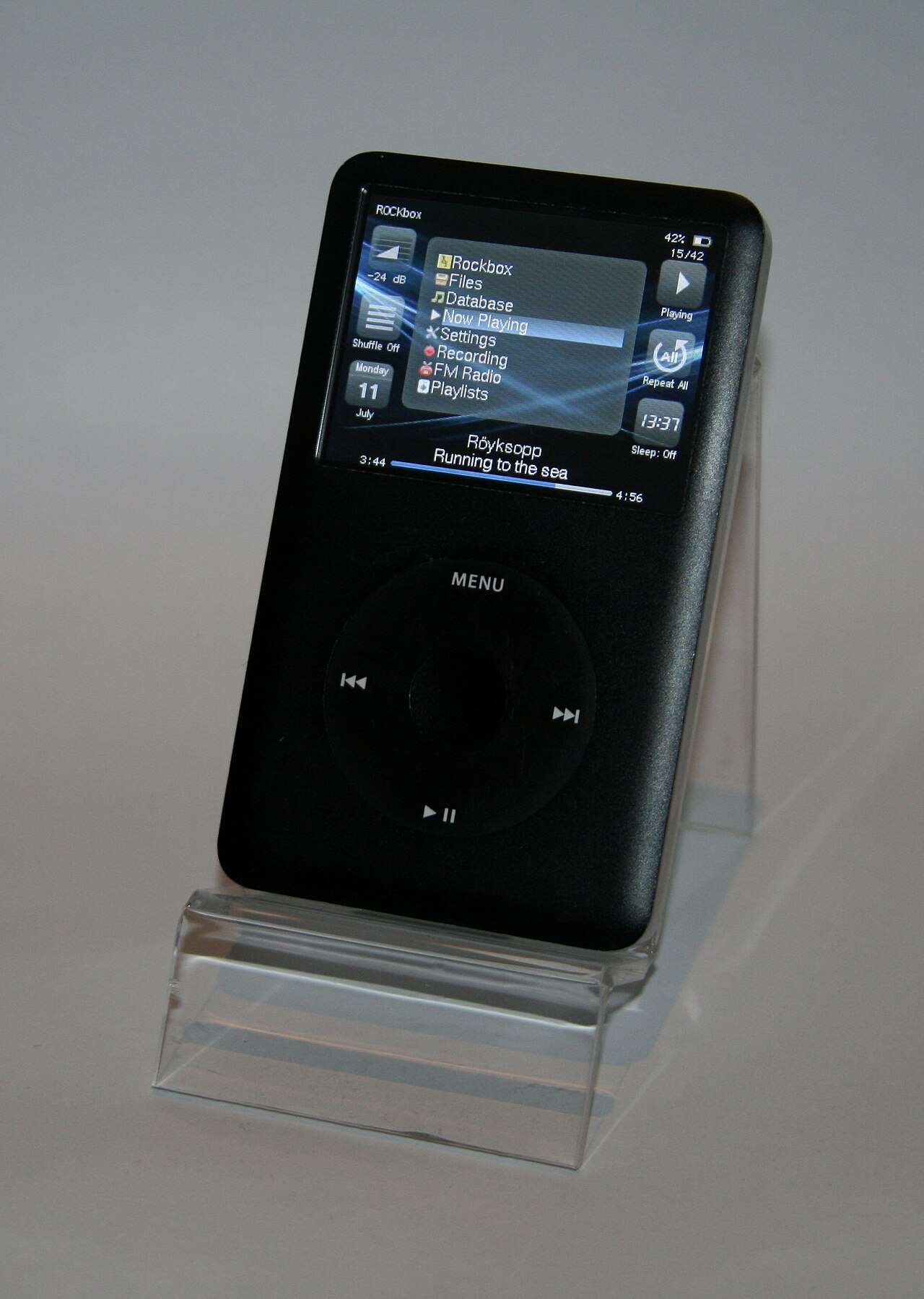
The cover photograph shows Rockbox running on a sixth-generation iPod classic in 2014. Files, Database, Settings, FM Radio, and Playlists share one small screen above the click wheel. It is not a mockup or a generic software image; it is one recognizable system made real through one particular device port.[7]
It replaces the abandoned layer, not the object
On a supported player, Rockbox is not an app running over the manufacturer's interface. It replaces the main firmware that browses the library, decodes audio, draws the screen, responds to buttons, manages playlists, and exposes settings. The project manual describes it as firmware written from the ground up, with development dating to 2001. It also makes the user-facing ambition unusually broad: configurable menus and themes, a voiced interface, multiple languages, sound controls, applications, games, and direct file browsing all belong to the same system.[3]
The replacement changes the ownership model of the device. Music can live in ordinary directories. A listener can browse those directories directly or initialize Rockbox's metadata database and navigate by artist, album, or genre. Configuration is stored in inspectable files; the manual's root menu order setting, for example, can reduce the main menu to a chosen sequence such as files,wps. Loadable plugins use the .rock extension and run one at a time with control of the interface. These are modest details, but together they turn a sealed product workflow into a small, configurable computer.[3]
An independent 2010 LWN review captured both sides of that bargain. Extra codec support and straightforward file transfer made an aging iPod more capable, while some plugins and playback paths were still rough enough to require a reboot. The review's central question was whether replacement firmware mattered as dedicated players gave way to phones. Fifteen years later, Rockbox 4.0 supplied an unexpected answer: the category could shrink without making the surviving hardware uniform, understood, or maintainable by itself.[5][6]
Portability is built from visible exceptions
The repository makes Rockbox's engineering shape legible. apps/ contains the application layer and its menus, interface code, keymaps, languages, and plugins. bootloader/ contains boot code. firmware/drivers/ and firmware/kernel/ hold shared lower-level machinery, while firmware/target/ branches into processor families and then particular players. There are separate target directories for devices such as the iPod Video, Sansa Clip, iriver H10, and Olympus M:Robe 100. uisimulator/ provides another boundary: interface work can run on a desktop without pretending the desktop is the final target.[4]
This directory reading is an inference from the source tree, but it matches the project's published support model. Rockbox does not call a port stable merely because someone once reached a menu. Its target-status guide requires a usable music-player build, installation instructions, and a released bootloader. If charging or USB is not implemented in Rockbox on a particular player, the port must support dual-booting into the original firmware for those functions. Stability therefore describes an end-to-end recovery and usage path, not just a successful compile.[2]
The result is portability without false sameness. A shared file browser can behave consistently while each port supplies its own button mapping. The same playlist logic can sit above different storage controllers. A common plugin format can expose a calculator, text viewer, metronome, or game, but the manual still warns that a plugin may stop playback and must be exited before the normal interface returns. The abstractions are useful because their limits remain named.[3][4]
The boot chain is part of the user experience
The iPod Video manual separates installation into three pieces. Apple's factory bootloader remains in the player's flash memory and supplies the manufacturer's emergency and disk modes. A Rockbox bootloader, loaded from disk by that first stage, chooses and starts Rockbox while providing dual boot. The main Rockbox build then lives in a .rockbox directory on the storage volume, which makes the bulk of the firmware replaceable without rewriting the factory boot path each time.[3]
That sequence matters more than the convenience of the installer. Firmware replacement is credible only when the operator can identify the exact hardware, enter disk or recovery mode, understand which bootloader is being changed, and return to a known state. Rockbox Utility automates much of the installation, but the manual keeps the manual procedure and model-specific requirements visible. For the fifth-generation iPod covered by that manual, Rockbox expects a FAT32-formatted device and explicitly does not support the HFS+ layout used by Mac-initialized iPods.[3]
There is a larger OSS lesson here. Reversibility is not a paragraph added after the architecture; it is part of the architecture. The factory loader, Rockbox loader, firmware directory, original firmware, and disk mode each have a distinct job. When those jobs remain separate, an upgrade or failed build has somewhere to retreat. When a user skips the model check or treats raw-disk access as an ordinary file copy, the same flexibility becomes risk.
A local library stays simple because the complexity is elsewhere
Once installed, Rockbox can be pleasantly boring. Copy audio files onto the device, browse the directory tree, or let the database index tags. Playing one file creates a current playlist from its directory; that playlist can then be reordered, extended, or saved. There is no requirement that every track first pass through one desktop catalog. The file browser can also rename, copy, move, or delete files and dispatch recognized formats to viewer plugins.[3]
The simplicity is not magic. It is paid for in codecs, metadata parsers, filesystem support, storage drivers, and target testing. Rockbox 4.0 updated FLAC, Speex, and WMA Pro support; improved MP4/AAC handling, embedded album art, and long-file seeking; and restored Opus optimizations. It also added GPT support, drives larger than 2 TiB in principle, and better ATA SSD behavior, while retaining a 2 TiB limit for individual partitions with 512-byte sectors. High-rate playback can reach 192 kHz on capable hardware, but playback remains limited to 16-bit audio.[1]
Those qualifications are the point. A flash-storage modification may reduce seek time without raising transfer speed because an old player's bus is still slow. A large replacement drive may meet a filesystem ceiling or expose an adapter quirk. The current iPod Video manual warns that multi-card SD adapters behave more like a striped volume than independent disks, so one card failure can make the whole set inaccessible. Open firmware can improve the storage path; it cannot repeal the electrical and mechanical facts of a twenty-year-old device.[3]
Version 4.0 advanced by deleting as well as adding
Rockbox 4.0 changed more than 660,000 lines with contributions from more than 80 authors. It added support for players including the FiiO M3K, Shanling Q1, and xDuoo X3ii and X20, and promoted several newer ports to stable status. At the same time, it removed the Archos Player, Recorder, FM Recorder, and Ondio families—the machines from which Rockbox originally grew—along with several unfinished ports.[1]
That subtraction is a healthy maintenance signal. The release notes say removing the oldest devices reduced complexity in the core, while preserving earlier releases and the associated themes for people who still need them. Compatibility was treated as a versioned artifact, not an eternal promise that every historical branch must constrain current code. The project could then improve shared APIs, unify its supported-device toolchain on GCC 4.9.4, move its simulator to SDL2, and consolidate project services on community-controlled infrastructure.[1]
LWN's release notice was brief, but its existence closed a long loop: the publication that had questioned Rockbox's future in 2010 was reporting a major release in 2025, still aimed at dedicated audio players.[5][6] Rockbox did not survive by becoming a generic phone app. It survived by continuing to know a finite collection of real devices deeply enough to boot them.
The status table is part of the product
The most trustworthy Rockbox page may be its least glamorous one. The target table distinguishes players with “NO MAJOR ISSUES” from devices with “SERIOUS ISSUES,” retired ports, and development targets whose sound, display, storage, buttons, charging, USB, or installer support may be partial or absent. Even stable rows expose differences: some players can use USB and charge under Rockbox but cannot dual-boot; others rely on the original firmware for a missing function.[2]
That table prevents a common open-source failure: turning the existence of code into a promise of usability. A directory in the repository proves that work happened. It does not prove that today's installer recognizes the device, that charging is safe, that recovery is documented, or that a volunteer still has the hardware needed to reproduce a fault. Rockbox publishes those distinctions instead of flattening them into a giant compatibility logo.[2][4]
For a prospective user, the adoption test is correspondingly concrete. Match the exact model and generation, not just the brand name. Read that target's status row and manual. Confirm the filesystem and recovery path before installing. Treat battery condition, storage adapters, cables, and physical controls as part of the system. Prefer a stable release unless you have a reason to test a development build, and keep the original firmware reachable when the port depends on it.[2][3]
Rockbox is a strong fit for someone who owns a listed player, keeps a local audio library, accepts model-specific setup, and wants the device's behavior to remain inspectable and configurable. It is a poor fit for anyone hoping software alone will repair failing cells, undocumented flash, or an only-partly-working port. The project offers ownership, not exemption from hardware.
That is the achievement hiding behind the novelty of Doom on an iPod. Rockbox does not keep old players alive by declaring them interchangeable. It keeps them useful by maintaining a common system one exact port, boot path, storage constraint, and honest status label at a time.
Sources
- Rockbox, “Release Notes for Rockbox 4.0” — release timing, device additions and removals, storage and codec changes, contributor scale, simulator work, infrastructure, and known limits.
- Rockbox, “Rockbox Status on Various Targets” — the definition of a stable port and current per-device status for USB, charging, dual boot, original firmware, sound, display, storage, controls, and installer support.
- The Rockbox Team, The Rockbox Manual for iPod Video — chapters 1–4 and 12–13 on the firmware, boot chain,
.rockboxdirectory, FAT32 requirement, file and database browsing, plugins, configuration, storage modifications, and recovery. - Rockbox,
Rockbox/rockboxsource mirror — repository boundaries amongapps,bootloader,firmware, target-specific code, plugins, tools, and the UI simulator. - Jonathan Corbet, “Rockbox 4.0 released,” LWN.net, April 2, 2025 — independent release notice and summary of the project's return to a formal release.
- Joe “Zonker” Brockmeier, “Rockbox 3.6 and beyond,” LWN.net, June 16, 2010 — independent hands-on account of installation, codecs, file transfer, plugins, defects, and the contemporary question of Rockbox's relevance.
- Havarhen, “iPod classic 6G with Rockbox firmware,” Wikimedia Commons, February 28, 2014 — archival photograph used as the article image.