A web interface does not become accessible because its visible controls look orderly or because an automated scan returns a short list. The decisive interface may be the one reconstructed from headings, landmarks, labels, states, focus order, and live updates, then delivered as speech or braille. If that reconstruction is incoherent, the polished page and the broken page are the same product.
Deque Systems' 20-minute tutorial, “Accessibility Testing with the NVDA Screenreader,” is a compact way into that second interface. Presenter Matt Isner installs and configures the open-source Windows screen reader, opens Speech Viewer, makes its current target visible, explains Browse and Focus modes, and finishes by exercising accessibility fixes.[1] The mechanics are old enough that a few menu details have changed. The testing model has not: make NVDA's interpretation observable, learn how a screen-reader user moves, and verify behavior through the keyboard rather than watching the pointer.
This is not a niche compatibility ritual. In WebAIM's 2024 survey of 1,539 screen-reader users, 65.6% reported commonly using NVDA, while 71.6% said headings were the first method they would use to find information on a long page. WebAIM cautions that its sample was uncontrolled, so those figures are signals rather than universal market shares. They still show why semantic HTML is a production surface, not documentation polish.[6]
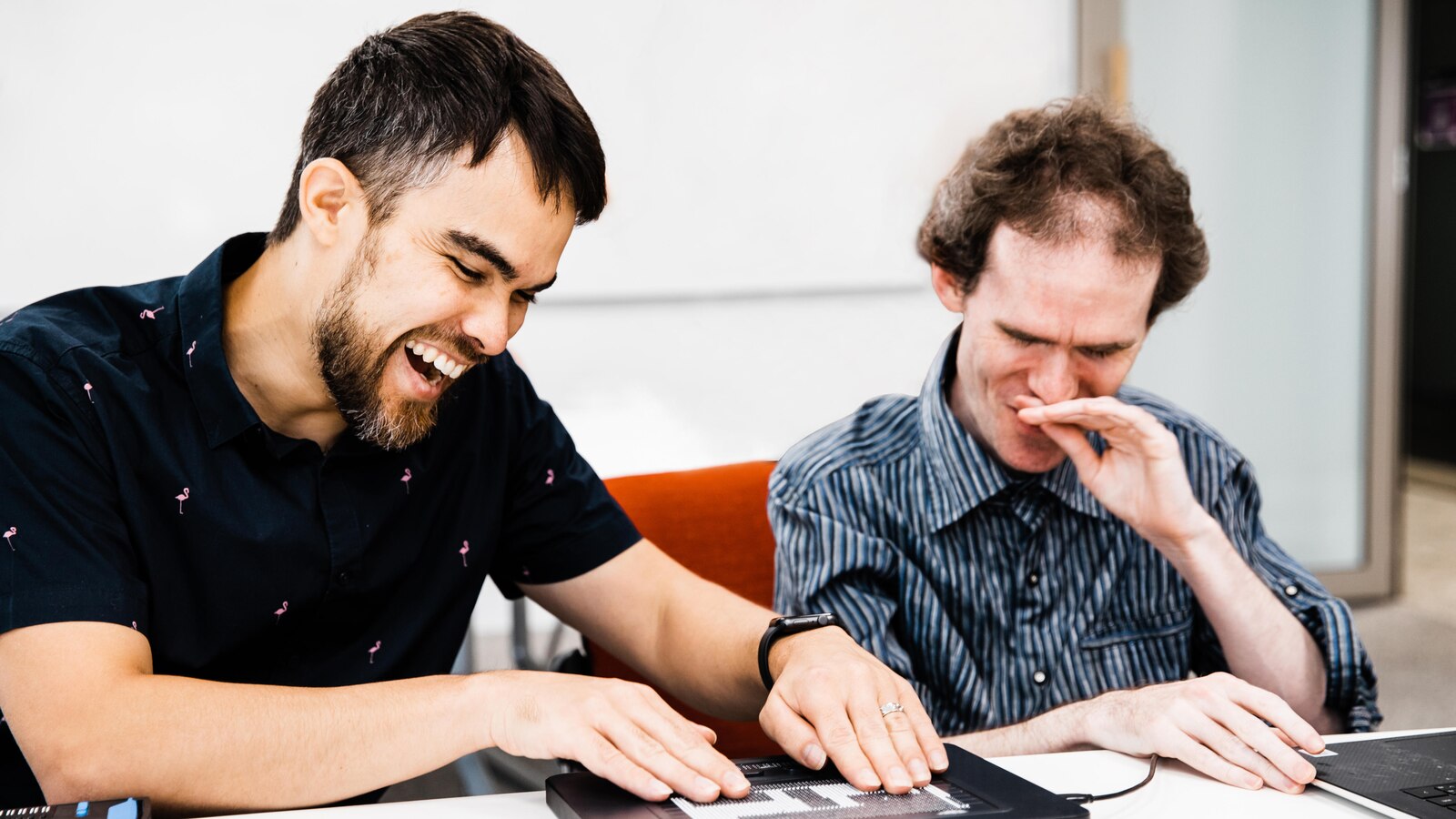
Image context: the cover photograph shows NVDA's founders, Jamie Teh and Michael Curran, feeling a prototype braille graphic display. Their project began from the practical fact that commercial screen readers could cost more than the computer, then grew through blind-led development and volunteer translation. The photograph keeps the article attached to the people and hardware at the receiving end of the accessibility tree.[5][7]
Around 2:20, Speech Viewer makes output inspectable—not complete
The tutorial's first important move is to open Speech Viewer, a window that prints the text NVDA is sending to its speech synthesizer.[1] For a sighted developer, this is immediately useful. A vague icon button becomes “button” with no name; a well-built one becomes “Search, button.” A decorative image either disappears as intended or leaks a filename into the reading order. The output can be copied into a bug report and compared before and after a patch.
That convenience has a limit. NVDA's current user guide still includes Speech Viewer, and WebAIM's testing guide recommends it as a way to see what the screen reader reads.[2][3] Accessibility specialist Sara Soueidan adds the necessary caution: the log does not always fully represent what is announced.[4] Timing, pauses, earcons, braille output, keyboard behavior, and the relationship between an announcement and the action that caused it do not collapse into a trustworthy text fixture.
Treat Speech Viewer like a trace, not an oracle. It helps locate the boundary where a component's visual label, programmatic name, role, state, and description diverge. It cannot prove that a person can complete the task. The stronger regression record combines the trace with the exact keyboard route and expected state change: “Open the dialog with Enter; focus moves to its heading; the error is announced after submit; Escape closes it; focus returns to the trigger.” That is testable behavior, not a screenshot with narration.
Around 6:30, two modes explain why a Tab-only audit lies
The tutorial then turns to NVDA's Browse and Focus modes.[1] In Browse Mode, NVDA presents a virtual document and reserves ordinary keys for structural navigation: H moves through headings, D through landmarks, and other quick keys reach links, lists, tables, graphics, and form fields. In Focus Mode, keystrokes are passed to the active control so the user can type into an edit field or operate an application-like widget. NVDA+Space switches modes when the automatic choice is not right.[2]
This division exposes a common engineering mistake. Pressing Tab through a page exercises focusable controls; it does not exercise the document. A tester can reach every button and still miss a nonsensical heading hierarchy, duplicated link names, content inserted in the wrong reading order, or a region that has no useful landmark. The reverse failure also exists: arrowing through prose can sound perfect until an autocomplete, tree, or custom listbox traps Focus Mode or ignores its expected keys.
WebAIM's guide likewise separates reading and navigation from form interaction: structural single-key shortcuts move through a document, while Tab, arrow keys, Space, and Enter operate controls.[3] That distinction suggests better review questions. Is an element announced? Can Tab reach it? Do arrow keys work inside it? Does NVDA enter Focus Mode when the control needs its own keystrokes? Those are different paths through the same component. A credible test uses both modes and knows which path it is evaluating.
The video's add-on aged; its debugging principle did not
The 2016 recording recommends a Focus Highlight add-on so a sighted tester can see what NVDA is tracking.[1] Modern NVDA has Visual Highlight built in under its Vision settings; the extra add-on is no longer the normal setup.[4] This is exactly the sort of drift that makes old tool tutorials dangerous when watched as installation scripts and valuable when watched as engineering records.
The durable idea is observability across perspectives. Speech Viewer externalizes spoken text. Visual Highlight externalizes system focus, navigator-object position, and Browse Mode's virtual caret for someone following on screen.[2][4] Neither feature changes the accessible experience. They let a paired tester compare what a sighted reviewer thinks is active with what NVDA has actually selected.
Open source matters here in a practical, non-romantic way. Curran began NVDA in 2006 and invited Teh into the work; they formed the charity NV Access in 2007 to keep the screen reader free and responsive to blind users.[5] The current documentation, add-on system, issue tracker, translations, and release train make the test instrument inspectable and distributable. That does not make one NVDA run representative of JAWS, VoiceOver, TalkBack, every browser, or every user's settings. It makes a serious first test available to any Windows team without a license gate.
Around 13:30, shortcut navigation turns markup into product navigation
In the later keyboard section, the video stops looking like setup and starts revealing the interface developers own.[1] NVDA+F7 opens an Elements List for links, headings, form fields, buttons, and landmarks; single-letter commands move directly among structural types.[2][3] These are not power-user decorations. They are alternative indexes over the page.
The WebAIM survey makes the consequence concrete. Heading navigation was the first choice for 71.6% of respondents looking for information on a lengthy page, and 88.8% found heading levels very or somewhat useful.[6] A heading chosen because its font size looked right can therefore corrupt a user's primary navigation hierarchy. Twenty “Read more” links may be tolerable beside twenty visual cards yet useless in a links list. A button drawn with a background image can be visually obvious and programmatically nameless.
The repair is usually less ARIA, not more. Start with native headings, buttons, links, labels, lists, and form controls; preserve a logical DOM order; add a programmatic name where the visible content does not supply one; use state and live-region semantics only when the interaction needs them. Then listen to the result in context. The objective is not to make Speech Viewer print every attribute. It is to give the shortcut index and the sequential reading path enough structure to support a real task.
In the final minutes, a fix is proved by retracing the route
The tutorial closes by applying the configured screen reader to accessibility fixes.[1] That sequence is more important than any one shortcut. Begin with a task and a reproducible route. Record what NVDA announces and where focus moves. Change the component. Refresh or restart the relevant state. Repeat the same route in Browse and Focus modes. Finally, attempt the task without the visual shortcut of a mouse.
Teams should keep the boundary conditions explicit. NVDA is a Windows screen reader, and results vary by browser: WebAIM's survey found NVDA with Chrome and NVDA with Firefox were both common combinations.[6] A trained sighted tester can catch missing names, broken structure, silent updates, and focus failures, but cannot convert a tool session into lived experience. Critical flows still benefit from disabled-user testing, and cross-platform products need VoiceOver and TalkBack coverage as well.[4][6]
The video's lasting value is therefore not “install NVDA and certify the page.” It is a better feedback loop. Automated checks find machine-detectable violations. NVDA exposes the semantic interface those rules were trying to protect. Speech Viewer and Visual Highlight help a developer debug it. Browse Mode, Focus Mode, and structural shortcuts test different routes through it. Human use decides whether those routes amount to access.
Sources
- Deque Systems, “Accessibility Testing with the NVDA Screenreader,” presented by Matt Isner, YouTube video.
- NV Access, “NVDA 2026.1.1 User Guide” — current reference for Speech Viewer, Browse Mode, Focus Mode, input gestures, Visual Highlight, and the Elements List.
- WebAIM, “Using NVDA to Evaluate Web Accessibility” — keyboard-only testing, Speech Viewer, quick navigation, forms, images, and Browse/Focus modes.
- Sara Soueidan, “Setting up a screen reader testing environment on your computer” — independent guidance on Visual Highlight, Speech Viewer limitations, browser pairings, and manual testing.
- Andrew Kidd Fraser, “Software by the blind, for the blind,” University of Queensland Contact Magazine, 2020 — project history, blind-led development, free distribution, and volunteer translations.
- WebAIM, “Screen Reader User Survey #10 Results,” February 2024 — usage, browser combinations, heading-navigation behavior, and sampling caveats.
- Kristine Taylor and Susan Chenery, “How friendship between NVDA founders Mick Curran and Jamie Teh is changing lives for thousands of blind people,” ABC News/Australian Story, 2023 — project context and Kate Wilson's photograph of the founders testing a braille graphic display.