A useful speech measurement should lead back to a moment someone can listen to. Praat makes that connection practical: the same desktop application lets a researcher play a recording, label its parts, inspect acoustic estimates, and turn a repeated procedure into a script. For a small team assembling a speech dataset, that is a substantial amount of laboratory work in one open-source program.[1][2][3]
Created by Paul Boersma and David Weenink at the University of Amsterdam, Praat provides speech analysis, synthesis, and manipulation, with downloads for Windows, macOS, and Linux. The complete application is distributed under the GNU General Public License, version 3 or later.[1] Its appeal becomes clearest when a research question gets specific: where does this vowel begin, which part should be measured, and can somebody else revisit the decision?
Give a stretch of sound a name
Imagine a student comparing the duration and vowel quality of several speakers saying the same word. This is an illustrative workflow, not a reported experiment. Before comparing any numbers, the student needs to identify the relevant stretch of each recording.
Praat's SoundEditor lets them select and replay a region. It can also copy a selection into a separate Sound object for further analysis.[3] That short loop between looking and listening is useful when a boundary is unclear: an abrupt visual change becomes something to hear again, in context.
Annotations live in a different object, the TextGrid. A TextGrid can hold several tiers, such as words and individual speech sounds. Interval tiers label spans between boundaries; point tiers mark individual moments. Creating a TextGrid from a Sound gives the two objects the same time domain, and selecting them together opens the recording alongside its labels.[2]
The separation has a practical consequence: saving the annotations does not save the audio inside them. Praat can write a TextGrid as readable text, so its times and labels remain accessible outside the application.[2] My recommendation for a shared dataset is to preserve the recording and its matching TextGrid together, with stable names. Otherwise, a perfectly legible annotation file can lose the evidence it describes.
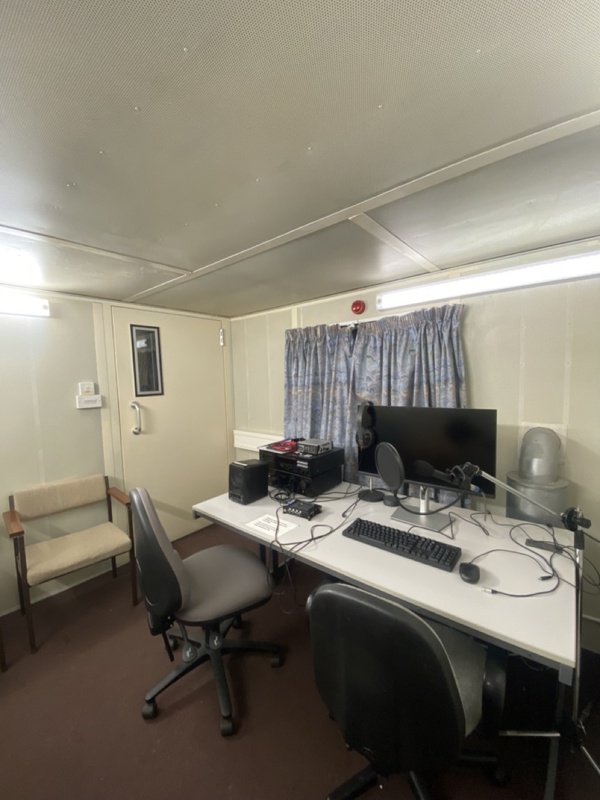
The accompanying photograph shows the physical setting behind this work. Cambridge's Phonetics Laboratory lists a sound-treated recording booth, portable recorders, and computers with Praat among their software.[10] The application belongs within a recording and analysis practice; the microphone and the saved audio still matter.
A formant estimate has settings behind it
To investigate vowel quality, our student might examine formants: resonances associated with the vocal tract. Praat's source-filter tutorial describes speech as a source signal shaped by the resonances of the tract through which it passes.[4] Estimating those resonances from a recording introduces another set of choices.
The command Sound: To Formant (burg)... performs analysis over successive short windows. Its Formant ceiling sets the upper limit of the search range. The manual gives 5,000 Hz and 5,500 Hz as example settings for average adult male and female speakers, respectively, while explicitly warning about substantial variation between speakers and vowels. These are starting points to investigate, not dependable settings selected by a demographic label.[5]
A higher ceiling can even make the low-frequency result worse. The manual illustrates how an unsuitable ceiling can collapse two expected low formants into one estimated peak. The number requested and the frequency range must make sense together.[5] A plausible-looking result therefore needs comparison with the recording and its spectral structure.
Praat offers a particularly revealing way to examine that dependence. A FormantPath holds multiple analyses of the same sound and a TextGrid recording which analysis is preferred in each interval. In the manual's example, the alternatives differ in their formant ceilings; the FormantPathEditor lets the user choose a path through them.[6]
That is a useful capability for difficult material: the alternatives can remain available for review. It also leaves a scientific responsibility with the researcher. A choice among estimates needs an acoustic justification; choosing the one that makes a hoped-for pattern look tidiest would undermine the comparison.
Let a checked procedure become a script
Repeating a measurement by hand soon becomes tedious. Praat's scripting language uses the menu and action commands familiar from the interface, and supports variables, loops, and queries.[7] A researcher can build on a procedure they already understand rather than immediately having to reimplement the analysis elsewhere.
The history mechanism makes that transition unusually approachable. Open a ScriptEditor, clear the history, perform the intended actions, then use Paste history. Praat records commands, object selections, and settings entered in their dialogs; the resulting text can be edited and saved as a script.[8] The settings that were briefly visible in a dialog can become part of a reviewable method.
A recorded sequence is still a starting point. My suggested next step is to make file selection and analysis parameters explicit, then compare the scripted output with a few manually inspected examples. An unsuitable formant ceiling becomes more consequential when a loop applies it to hundreds of recordings. Automation carries a decision farther; the initial checks determine whether that is helpful.
For a lone student, a short script and a clearly named audio-and-annotation pair may be enough to begin. A team with several annotators needs more agreement: what counts as a boundary, how uncertain segments are marked, and which settings and application version produced the measurements. These are workflow recommendations drawn from the separation of recordings, labels, and analyses, rather than features that Praat enforces automatically.
A manageable way into a large program
There is a substantial teaching layer around Praat. Will Styler's independent Using Praat for Linguistic Research guide grew out of a 2011 Linguistic Institute workshop and pairs explanations with practice recordings and scripts. Its coverage runs from basic measurements to synthesis and scripting.[9] That gives a newcomer a route through the application organized around research tasks.
For a first evaluation, take one recording through the whole chain: listen, annotate a meaningful interval, inspect an estimate, save the files, and reopen them. Then ask a colleague to find the same moment. Praat's value becomes tangible when a result is easy to question and the voice behind it remains within reach.
Sources
- Praat project, official source repository — project origins, analysis and synthesis features, platform downloads, and GPL licensing.
- Praat manual, “Intro 7. Annotation” — separate Sound and TextGrid objects, tiers, shared editing, and readable annotation files.
- Praat manual, “SoundEditor” — selecting, playing, and copying a region into an independent Sound object.
- Praat manual, “Source-filter synthesis” — the source-filter account of speech and vocal-tract resonances.
- Praat manual, “Sound: To Formant (burg)...” — windowed analysis, formant ceiling examples, and the consequences of unsuitable settings.
- Praat manual, “FormantPath” — retaining alternative analyses and selecting among them by interval.
- Praat manual, “Scripting” — menu and action commands, variables, queries, and loops.
- Praat manual, “History mechanism” — recording commands and settings and transferring them to an editable script.
- Will Styler, “Using Praat for Linguistic Research,” UC San Diego — independent teaching guide, workshop origins, practice recordings, and scripts.
- University of Cambridge Phonetics Laboratory, “Facilities and Equipment” — the laboratory's own account of its recording facilities and software, and source of the photograph.