A microscope experiment can fail while its preview looks perfectly healthy. The camera keeps producing pictures, but a filter arrives late, illumination misses part of an exposure, or frames accumulate faster than software can save them. Micro-Manager's architecture makes these problems easier to separate: device adapters translate commands, a shared core coordinates equipment, and acquisition software manages the experiment. Following one exposure through those layers reveals what each can promise.[1][3][4]
Micro-Manager is open-source microscope-control software with a graphical interface integrated with ImageJ. Its reusable foundation is MMCore, written in C++, beneath the interface and above adapters for cameras, stages, shutters, and other devices.[1] This account follows the project's online documentation and Core API reference checked on September 19, 2026; the research examples retain their publication dates.
Give different instruments a common vocabulary
An adapter translates a particular device's control interface into the operations MMCore understands. It is distinct from a manufacturer's driver, which may still need separate installation. For simpler serial equipment, the adapter can perform the driver role itself.[2]
The distinction becomes concrete in loadDevice(label, library, name): the experiment assigns a local label to a device supplied by an adapter library. After initialization, the program can address that label without embedding the manufacturer's command protocol everywhere.[2] Changing a camera therefore has a defined place in the software architecture, even when replacing its configuration takes work.
The common vocabulary also leaves room for differences. Devices expose named properties and report available values; a camera's specialized controls need not become universal microscope commands.[2] Portability consequently depends on capabilities as well as names. A routine that requires a particular trigger mode must establish that the replacement equipment and adapter actually provide it.
An independent 2022 perspective by Johannes Hohlbein and colleagues identifies Micro-Manager's plugin mechanism and accumulated device adapters as an example of how open microscopy can connect hardware to diverse software. The authors also emphasize the difficulty of integrating control, processing, and analysis.[6] Sharing an interface is the beginning of that work.
Waiting for motion is one kind of synchronization
Before exposing a sample at a new focal plane, software may need to wait for the stage. The programming guide describes a device Busy flag and waitForDevice("Z"), which waits for the named device to finish its previous operation. It explicitly distinguishes this mechanism from synchronization using hardware pulses.[2]
That distinction matters because a sequence of correctly ordered requests can still have variable gaps. The operating system, communications link, and device API all contribute delays. In fast experiments, those gaps can alter the light collected during an exposure.[4]
Marshall Colville and colleagues demonstrated the consequence in a 2019 Scientific Reports study of a custom fluorescence microscope. They used Micro-Manager for camera and filter-wheel control, then compared software-controlled illumination with a dedicated hardware controller driven by the camera's exposure signal. They measured actual light timing with a photomultiplier and an oscilloscope.[4]
Their hardware arrangement improved synchronization and reduced imaging artifacts. This was a result for their instrument, not a universal Micro-Manager performance figure. The authors also warned that incorrectly implemented hardware control could introduce equal or worse errors.[4] The architectural lesson is precise: software can arrange the experiment while an electrical signal coordinates its fastest actions. The relationship between that signal and the light reaching the specimen still needs measurement.
The buffer separates capture from consumption
A stream of exposures introduces a second timing problem: keeping the pictures. MMCore's startSequenceAcquisition starts streaming without blocking the calling thread for the full acquisition. Images enter a circular buffer from which another part of the program retrieves them.[3]
Two API calls expose different intentions. getLastImage() retrieves the most recently inserted image; popNextImage() retrieves and removes the next available one. A display interested in the newest view has a different job from a recorder responsible for consuming the sequence. getRemainingImageCount() reports the queued images, and isBufferOverflowed() exposes overflow.[3]
Consider an illustrative workload, not a benchmark: a 2,048 × 2,048 image stored at two bytes per pixel occupies 8 MiB before metadata. At 50 frames per second, that is 400 MiB per second. If the complete downstream path sustains only 300 MiB per second, the backlog grows by 100 MiB each second. An otherwise empty 1 GiB buffer buys roughly ten seconds under those assumptions. More memory extends the burst; it cannot balance a permanently slower consumer.
The API makes the failure policy visible through stopOnOverflow: stopping when the buffer fills or allowing frames to be skipped. Its current reference also labels the former intervalMs argument unused, advising 0.0; configurable frame rates typically belong in camera properties.[3] A plausible-looking function argument is insufficient evidence of actual capture timing.
Keep the experiment above the equipment
The same separation permits a different programming interface above Micro-Manager's device layer. Pycro-Manager's 2021 paper describes acquisition events for hardware settings and image coordinates, hooks for code at stages of acquisition, and image processors that can feed results back into subsequent actions.[5] A program can decide what to image next without replacing every camera and stage adapter.
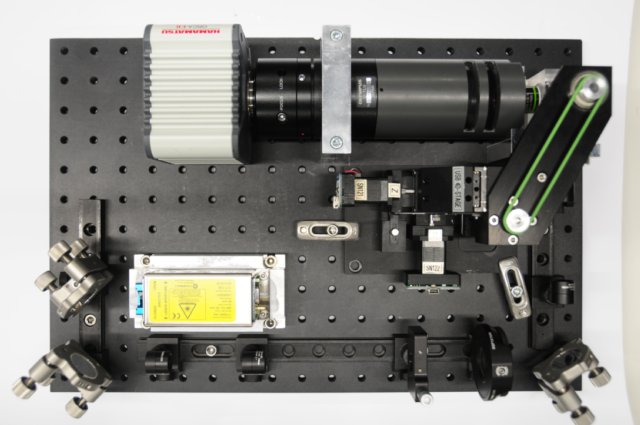
OpenSPIM gives this arrangement a physical setting. Its open light-sheet microscope combines optical components, specimen motion, and a detector; its software builds on Micro-Manager and Fiji.[7] The assembly photograph records an instrument made of separate parts, each contributing its own behavior to the finished experiment.[8]
My practical reading is that a small lab gains most when someone can own the configuration and validate a representative acquisition from motion through saved data. A faster or more customized rig also needs expertise in triggers and sustained data handling. Before trusting a long run, establish three things independently: the requested device state was reached, illumination matched the exposure, and the expected frames reached storage. The preview answers only a fraction of that question.
Sources
- Micro-Manager, “Micro-Manager Project Overview” — graphical interface, MMCore, device adapters, and separation of software layers.
- Micro-Manager, “Micro-Manager Programming Guide” — adapter loading, manufacturer drivers, device properties, and busy-state synchronization; the page notes its C++ layer applies to versions 1 and 2.
- Micro-Manager, “CMMCore Class Reference” — sequence acquisition, circular-buffer access, overflow policy, and the unused interval argument; online reference checked September 19, 2026.
- Marshall J. Colville and colleagues, “High-speed device synchronization in optical microscopy with an open-source hardware control platform,” Scientific Reports, August 21, 2019 — instrument-specific timing measurements and control limits.
- Henry Pinkard and colleagues, “Pycro-Manager: open-source software for customized and reproducible microscope control,” Nature Methods, March 5, 2021 — acquisition events, hooks, and image-processing feedback.
- Johannes Hohlbein and colleagues, “Open microscopy in the life sciences: quo vadis?,” Nature Methods, August 25, 2022 — independent perspective on device adapters, integration, and support.
- OpenSPIM, “Welcome to OpenSPIM” — light-sheet microscopy, specimen movement, and the project's use of Micro-Manager and Fiji.
- OpenSPIM, “Step by Step Assembly” — construction documentation and the original photographic assembly image, Real_18.jpg.