A scan can leave a building open to the sky. Imagine an operator recording its walls from ground level while the roof stays out of sight. MeshLab can turn incomplete observations into a continuous surface. Understanding how it does that means following three different operations: putting scans together, establishing surface direction, and reconstructing geometry between the samples.[1][5][6]
The distinction becomes visible in a tutorial from Lund University's DARK Lab: ground-based scans leave gaps at the top of a structure, and reconstruction produces rounded protrusions there.[2] Which parts of the result came from the scanner, and which came from the processing?
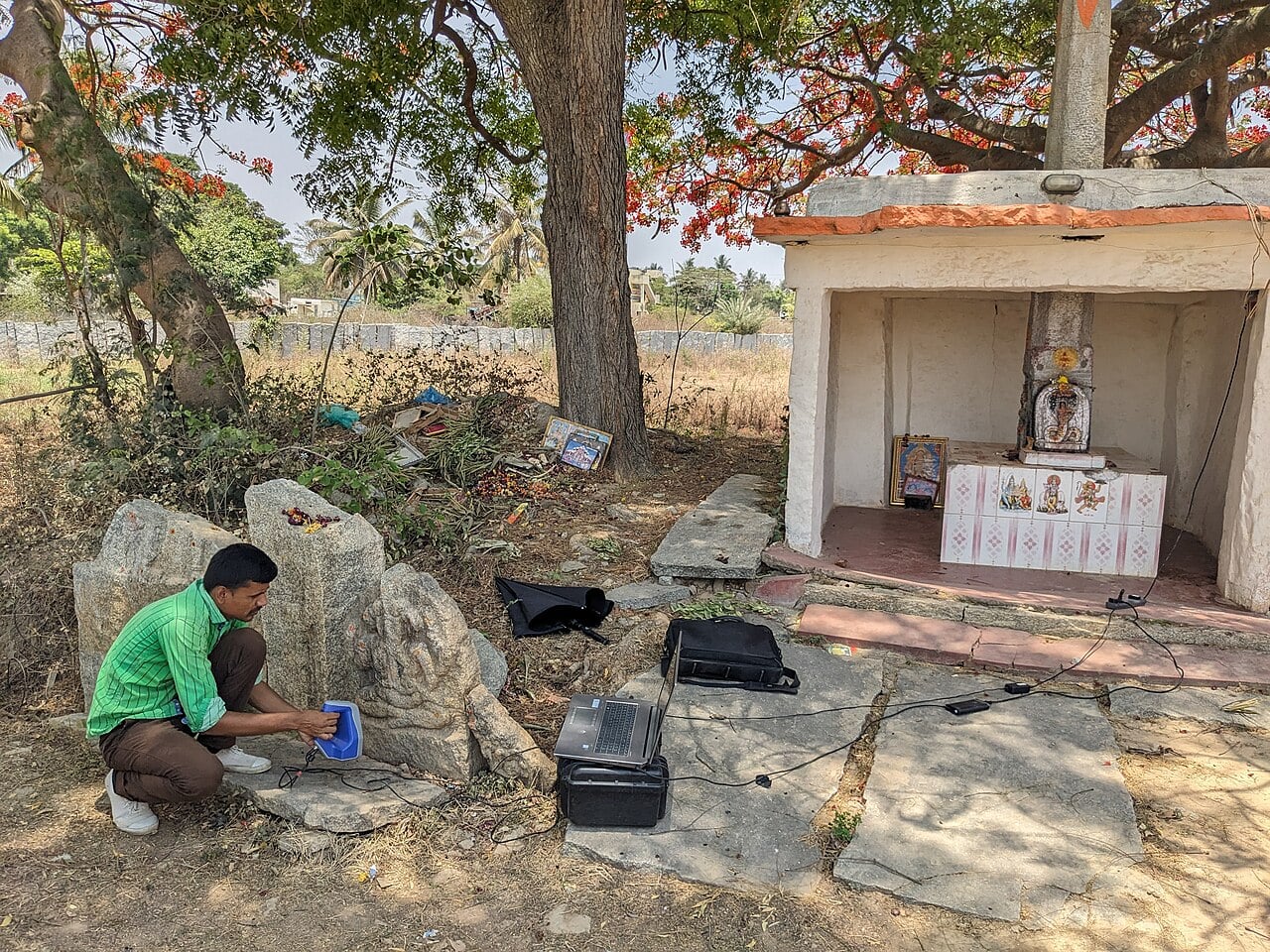
Separate scans need a shared position
MeshLab is an open-source workbench for processing triangular meshes and scanned data. Its tools cover cleaning, inspection, reconstruction, and preparation for printing.[1] Those capabilities are useful partly because a scan collection passes through several representations before it becomes a finished object.
Start with the layers. In PyMeshLab, the project's Python interface, a MeshSet contains meshes corresponding to MeshLab layers. Each has an ID, and one is the current mesh. Filters can change that current selection to their output.[4] This makes state matter: a later operation must act on the intended layer, especially after generating a new one.
Registration gives separate acquisitions a common coordinate system. DARK Lab's example uses MeshLab's alignment tool to refine scans that already nearly coincide; larger disagreements need an initial manual alignment. Its saved project records paths to the scan files and a transformation matrix for each.[2]
The handoff therefore needs the referenced scans as well as the project. Keeping individual layers also lets a reviewer inspect an overlap before combining observations.
Points need a direction
A point gives a position. Surface reconstruction also needs information about which way the nearby surface faces. A normal is the vector describing that direction.
MeshLab's “Compute normals for point sets” estimates normals without requiring triangles. Its neighbor-count parameter controls how many surrounding points participate; a known scanner viewpoint can help resolve their orientation.[5] This is another processing decision, made before a surface exists to inspect.
Screened Poisson reconstruction takes oriented points and builds a watertight surface. Michael Kazhdan and Hugues Hoppe's 2013 paper describes the “screened” extension as adding positional constraints that encourage the reconstructed surface to pass through the samples. The earlier Poisson method could smooth away detail; the extension improves fidelity to those positions.[6]
The word encourage matters. The output is a fitted surface, rather than a simple inventory of measured points joined in acquisition order. Its usefulness comes from reconciling samples into coherent geometry. Its evidential limit comes from the same operation: a coherent shape is not proof that every part of it was observed.
More triangles cannot supply a missing view
The reconstruction controls expose different choices. depth limits the adaptive octree used by the solver: at depth d, the finest possible grid resolution is 2^d along each axis, with actual subdivision adapting to sample density. pointweight controls the influence of the input positions; setting it to zero recovers unscreened Poisson reconstruction. samplespernode can be increased for noisier inputs to favor a smoother result.[5]
These controls address spatial detail, attachment to samples, and noise. None supplies a new scanner position. Increasing reconstruction detail still leaves the original coverage gap unresolved.
DARK Lab recommends saving trial outputs with the reconstruction settings in their filenames.[2] That small convention makes two plausible surfaces easier to compare: the difference can be traced to a parameter choice instead of being remembered as “the nicer version.”
Cleaning changes what survives
Reconstruction is followed by further decisions. Alejandro Romero's guide on Brown University's VR Software wiki describes removing small isolated pieces, simplifying geometry with Quadric Edge Collapse Decimation, and separating connected components for individual export.[7] These are distinct operations: discarding fragments, reducing complexity, and organizing pieces.
The guide provides an independent view of MeshLab as a place where an operator controls the cleanup. My reading is that this control also creates a review obligation. A diameter threshold can identify a small component; it cannot determine its archaeological significance. In a hypothetical scan of a broken ornament, a small detached piece might be the feature the researcher most needs to retain.
The intended use should decide how much simplification is acceptable. DARK Lab's introductory guidance distinguishes a reduced-scale print from analysis of tool marks and color: the latter demands different acquisition detail.[8] Processing should preserve that distinction through to the exported file.
Keep the decisions with the surface
For a small heritage team with someone able to inspect geometry, MeshLab offers a workable division of labor: examine layers interactively, preserve the inputs, and automate stable processing steps once their behavior is understood. PyMeshLab's apply_filter() records the invoked filter and parameters in its current filter script; scripts can be saved and loaded. The documentation also warns that a single MeshSet is not safe for concurrent filter execution.[4]
A script helps repeat operations. It still needs an explanation of why a region was removed or a reconstruction was accepted. I would keep the source scans, alignment project, processing settings, software version, and a short account of unresolved coverage gaps beside the delivery mesh. That bundle lets another operator revisit the judgment.
Return to the roof the scanner could not see. A finished surface may be useful for display while remaining unsuitable as evidence of that roof's shape. MeshLab makes the transformation possible; keeping its intermediate data and decisions makes the transformation inspectable.
Sources
- MeshLab project, official website — open-source scope, processing tools, and the PyMeshLab interface.
- Stefan Lindgren and Carolina Larsson, “Recording 3D data for monuments or larger volumes: postprocessing,” DARK Lab, Lund University — scan alignment, project files, missing coverage, and reconstruction trials.
- Mythic Society Inscriptions 3D Scanning Project, “3D Scanning of the Chikkasanne 9-10Th Century Ganesha Sculpture 08,” April 25, 2024, Wikimedia Commons — photograph and attribution.
- PyMeshLab documentation, “MeshSet” — layer identity, current-mesh behavior, filter scripts, and concurrency limits; consulted October 25, 2026.
- PyMeshLab documentation, “List of Filters” — “Compute normals for point sets” and “Surface Reconstruction: Screened Poisson”; consulted October 25, 2026.
- Michael Kazhdan and Hugues Hoppe, “Screened Poisson Surface Reconstruction,” ACM Transactions on Graphics 32(3), 2013 — original paper on positional constraints and surface fitting.
- Alejandro Romero, “Meshlab: Cleaning 3D Meshes,” Brown University VR Software wiki — independent instructional account of cleanup, simplification, and component export.
- Stefan Lindgren and Carolina Larsson, “Recording 3D data for monuments or larger volumes: introduction,” DARK Lab, Lund University — matching acquisition requirements to research and display uses.