LinuxCNC is not merely a free application that opens a G-code file and makes motors turn. It is a machine-control stack for the awkward territory between a part program and a moving tool: interpreting intent, planning coordinated motion, meeting real-time deadlines, reading sensors, driving outputs, and keeping the operator's interface separate from the electrical facts of one particular machine.
That scope explains both its longevity and its learning curve. The same project can control a mill, lathe, plasma table, robot, laser cutter, or 3D printer because it does not pretend those machines are interchangeable. Instead, it supplies stable control components and asks an integrator to describe the joints, limits, drives, encoders, switches, timing, and user interface that make a specific installation real. The official introduction says LinuxCNC can coordinate as many as nine axes; its repository is blunter about the price of that power: software alone must never be trusted as the only safety system for machinery capable of causing harm.[1][2]
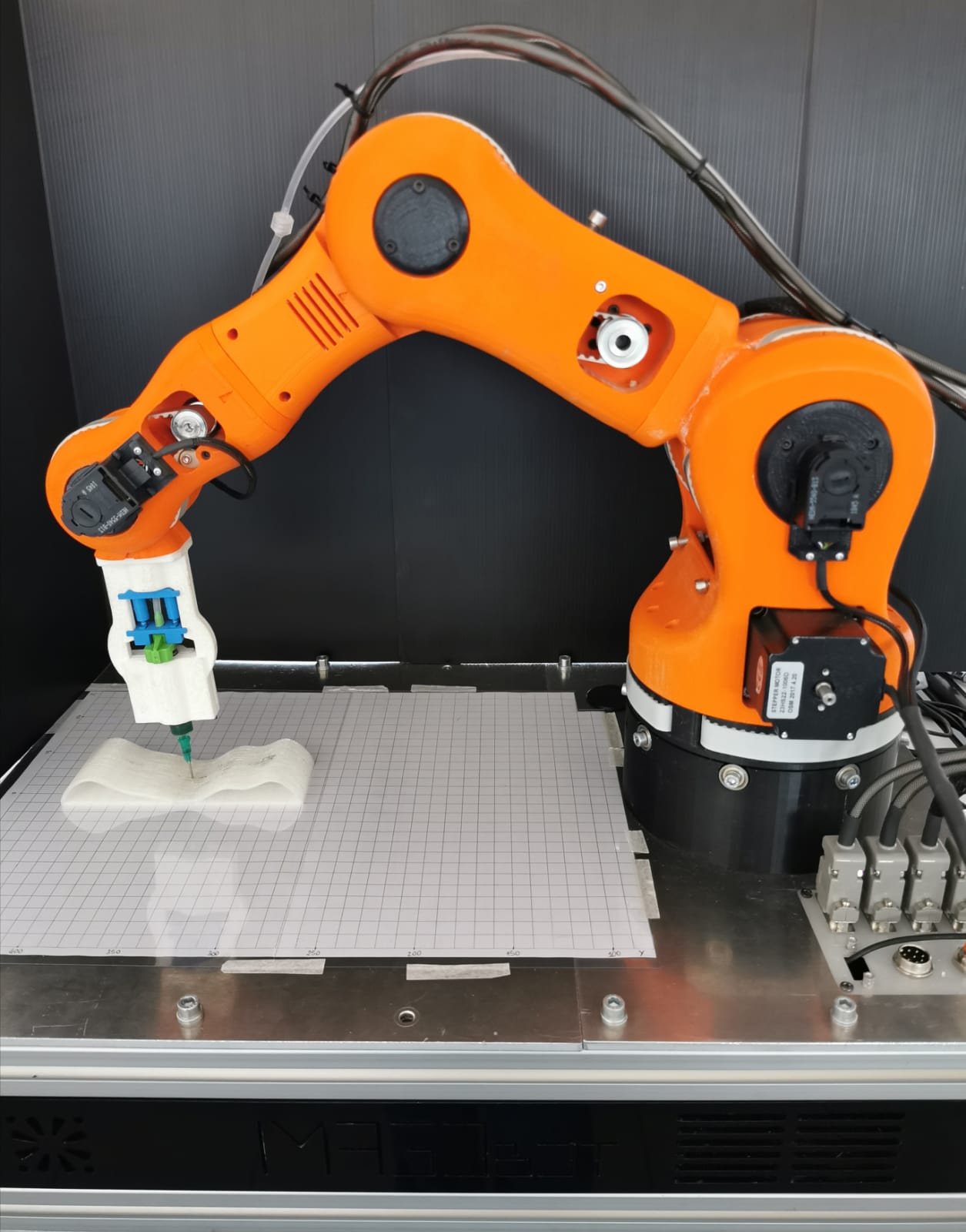
The cover photograph is a useful introduction in miniature. It shows an articulated BCN3D Moveo robot fitted for bioprinting, a project featured by the LinuxCNC community in 2021.[9] The orange arm is not a generic illustration of automation. It is evidence of the abstraction doing real work: motion control can be shared, but the machine's geometry, actuators, tool, work envelope, and hazards still have to be defined locally.
The controller began as an argument for open boundaries
LinuxCNC descends from the Enhanced Machine Controller, or EMC, developed at the U.S. National Institute of Standards and Technology. In a 1995 paper, NIST researchers described a modular controller divided into individual-axis control, coordinated trajectory generation, discrete input/output, language interpretation, and task planning. They installed an implementation on a four-axis horizontal machining center at General Motors' Pontiac Powertrain operation to test whether independently supplied components could interoperate and whether the controller could scale from simulation to a demanding machine.[7]
The historical point is more important than the pedigree. EMC was designed around replaceable interfaces because machine tools outlive computer platforms, proprietary control boards, and sometimes their vendors. The LinuxCNC history records how the NIST code moved toward Linux real-time extensions and cheaper interface hardware, then attracted users trying to revive machines whose original controls were obsolete or dead. In 2003, the community proposed the Hardware Abstraction Layer—HAL—as part of a larger restructuring of the code.[4]
An independent 2013 review later used LinuxCNC on a retrofitted three-axis industrial milling testbed and evaluated it as an open-architecture controller for research, process monitoring, and machine-tool renewal.[8] That is the project's durable problem context. LinuxCNC is most compelling when a machine is valuable, its control assumptions need to be inspectable, and the owner is willing to take responsibility for integration rather than rent a sealed appliance.
A part program is not a pulse train
The user-facing path begins with a graphical interface and a part program, but neither should be confused with the real-time controller. LinuxCNC separates the task executor (EMCTASK), general-purpose I/O controller (EMCIO), and motion controller (EMCMOT). The task layer coordinates program execution; the motion layer handles the controlled movement; the I/O layer handles machine functions outside axis motion. HAL connects those internal states to software components and physical hardware.[2]
That separation contains different kinds of time. An operator may pause before pressing cycle start. A G-code interpreter may look ahead and turn a line, arc, feed command, or tool operation into machine actions. A trajectory planner may blend successive moves while respecting velocity and acceleration constraints. None of those variable-duration activities should make the electrical edge that commands a stepper arrive late.
LinuxCNC therefore runs periodic work at different rates. Its HAL documentation describes a fast base thread, whose jobs can include producing step pulses or reading encoder position on the order of microseconds, and a slower servo thread, commonly operating on a millisecond scale for control and motion work. Non-real-time user-space components can be delayed by an otherwise busy computer; real-time functions are scheduled because their deadline is part of correct machine behavior.[3]
This is the first boundary an adopter has to understand: real time does not mean “very fast on average.” It means the worst late wake-up matters. A browser tab taking an extra 50 milliseconds is an annoyance. A software step generator missing its appointed edge can change speed, position, cut quality, or fault behavior. LinuxCNC's installation guide consequently requires a kernel with real-time extensions for machine operation, while allowing linuxcnc-uspace on a stock kernel for code testing and simulation only. The supported paths include PREEMPT_RT, RTAI, and Xenomai, and the live environment is meant to be latency-tested on the actual host before it is trusted to drive hardware.[5]
Simulation is not a lesser side feature here. It lets a team validate coordinate conventions, program flow, limits, custom interfaces, and much of the machine configuration without energizing motors. The NIST implementation already treated simulation before site installation as a benefit of the architecture.[7] A good retrofit uses that separation deliberately: prove the program's logic in a simulated machine, then prove the real host's timing, then commission physical I/O and motion under controlled conditions.
HAL is a wiring cabinet made legible
HAL is where LinuxCNC stops being a general controller and becomes this machine.
Components expose named pins carrying booleans, floating-point values, or signed and unsigned integers. Signals connect output pins to input pins. Parameters hold configuration. Functions are assigned to ordered periodic threads. A startup script loads the required components, creates the signal links, and schedules the functions; shared memory lets real-time and non-real-time pieces exchange state with low overhead.[3]
The electrical metaphor is exact enough to be useful. A limit switch input can feed both a visible status indicator and a motion-inhibit path. A spindle-speed command can pass through scaling before reaching a drive interface. Encoder feedback can enter a control component whose output goes to a servo drive. A home switch, probe, coolant relay, pendant button, and emergency-stop chain do not become equivalent merely because all can be represented by signals. Their names, direction, update rate, failure behavior, and physical circuitry preserve the difference.
Two text surfaces carry much of this machine definition. The main .ini file records high-level facts such as axes, travel limits, maximum rates, display choices, and references to other configuration files. HAL files express the loaded components and the connections between their pins. The standard configuration wizards can generate a starting point for common parallel-port or Mesa-based systems, but the generated files are still a claim about the hardware that must be reviewed against drawings and tested on the machine.[2]
This explicitness is LinuxCNC's best feature and its sharpest adoption filter. A signal path can be read, diffed, backed up, and restored. A custom component can add behavior without rebuilding the entire controller. But flexibility does not manufacture missing knowledge. If nobody can trace a field wire, identify whether an input is active-high or active-low, explain an encoder scale, or state what removes drive power after a fault, the configuration is not “open”; it is undocumented risk.
The hardware boundary is a choice, not a loophole
LinuxCNC supports more than the classic PC parallel port. Its current hardware guide covers Mesa FPGA interfaces over PCI/PCIe, Ethernet, parallel port, and SPI; open EtherCAT integration; Remora and LiteX-based options; and other device-specific paths. Some boards move time-critical functions onto an FPGA or controller, reducing the burden on host-side software pulse generation.[1][6]
That variety is not a promise that every connector is suitable for every job. The same guide says ordinary USB devices cannot control motors or other real-time tasks, and that USB-to-parallel converters are unsuitable for CNC. USB-to-RS485 or Modbus can serve non-real-time equipment such as a spindle variable-frequency drive, but not a deadline-critical path. Its Arduino connector warning is even more concrete: it is for I/O expansion, not timing- or safety-relevant limit and emergency-stop inputs.[6]
The practical design question is therefore not “Does LinuxCNC support Ethernet, USB, or this board?” It is “Where is each deadline enforced, and what happens when this link stalls?” A parallel-port step generator, an Ethernet-connected FPGA card, an EtherCAT servo network, and a Modbus spindle command distribute responsibility differently. The configuration should name that responsibility, and commissioning should include cable loss, delayed feedback, a stuck input, host overload, and controller restart—not only a clean air cut.
Hardware choice also sets the team's maintenance burden. A common, documented board with an upstream driver and a reproducible firmware image is a different proposition from a one-off adapter maintained in a forum thread. A small workshop may reasonably accept that trade in exchange for control over an irreplaceable machine. A production line with certification, spares, and recovery-time obligations needs a deeper support plan than “the source is available.”
Safety is deliberately outside the cleverest software path
LinuxCNC can coordinate an emergency-stop state in its control logic, but it cannot turn a general-purpose computer into the entire safety case. The repository warns that dangerous machinery needs a way to remove power from motors before anyone enters the hazard area and must comply with applicable safety codes.[1] That is not boilerplate at the edge of the project; it is the correct architecture boundary.
A machine's safe state depends on physics: stored pneumatic or hydraulic energy, gravity-loaded axes, a spinning spindle, hot tooling, relays that may weld closed, and drives that may retain power after a communication failure. Safety-rated contactors, drive-enable circuits, guards, interlocks, braking, and energy-isolation procedures belong in the machine design. LinuxCNC may report, coordinate, and test those states. It should not be the only thing preventing motion.
This distinction also improves ordinary diagnostics. When a commanded move does not happen, the operator should be able to separate task state, motion state, HAL signal state, field I/O, drive readiness, and the physical safety chain. When a stop occurs, logs and visible pins can explain what the controller believed without asking the controller's belief to substitute for de-energization.
Adopt it when you are ready to own the machine definition
LinuxCNC fits a retrofit, research platform, unusual robot, or specialist machine when three conditions hold. First, the hardware has enough value or specificity to justify integration work. Second, the team can own the electrical drawings, kinematics, timing budget, configuration, and recovery procedure. Third, open interfaces provide a concrete benefit: preserving an old machine, adding a custom process, choosing among motion hardware, or making control behavior inspectable.
A credible pilot is staged. Run the intended configuration in simulation. Put the .ini, HAL files, custom components, interface firmware, and operator-screen code under version control. Measure latency on the exact computer with its intended BIOS settings and workload. Commission one I/O family at a time, beginning with power and safety state, then limits and homing, then low-speed motion. Verify direction, scale, following error, and loss-of-link behavior before pursuing feed rate. Finally, make a cold spare or restoration image and prove that a second person can rebuild the controller from the recorded artifacts.[2][3][5]
LinuxCNC is a poor shortcut for a team that wants a plug-and-play desktop appliance, has no one prepared to read machine wiring, or expects community software to assume vendor liability. It is also the wrong place to hide an improvised safety circuit behind a polished custom screen. In those conditions, a supported commercial controller or an experienced integrator may be the cheaper system even when its license price is higher.
The project's real introduction is simpler than its component list. LinuxCNC keeps machine intent, motion deadlines, configurable wiring, hardware interfaces, and physical safety on distinct surfaces. That separation lets a decades-old mill and a bioprinting robot share a controller without pretending they are the same machine. It also leaves the owner with an honest obligation: if the system is inspectable, someone must inspect it.
Sources
- LinuxCNC project repository — supported machine classes, current source tree, licensing, and the project's explicit physical-safety warning.
- LinuxCNC, “User Introduction” — GUI, HAL,
EMCMOT,EMCIO,EMCTASK, nine-axis scope, and machine-specific configuration files. - LinuxCNC, “HAL Introduction” — components, pins, signals, shared memory, base and servo threads, and configuration flow.
- LinuxCNC, “Origin” — NIST/EMC history, early retrofit use, Linux real-time migration, community growth, and the 2003 HAL proposal.
- LinuxCNC, “Getting LinuxCNC” — real-time kernel choices, stock-kernel simulation boundary, live installation, and latency testing.
- LinuxCNC, “Hardware Interface” — parallel-port, Ethernet, EtherCAT, PCI/PCIe, SPI, FPGA-offload, and USB boundaries.
- Frederick M. Proctor, William P. Shackleford, and Charles W. Yang, “Simulation and Implementation of an Open Architecture Controller,” NIST, 1995 — modular controller boundaries and the GM deployment.
- Tomislav Staroveški, Danko Brezak, and Toma Udiljak, “LinuxCNC – the enhanced machine controller: application and an overview,” Technical Gazette 20(6), 2013 — independent review and three-axis milling testbed.
- LinuxCNC Showcase, “A Robotic Bioprinter Controlled by LinuxCNC,” May 17, 2021 — project context and source page for the cover photograph.