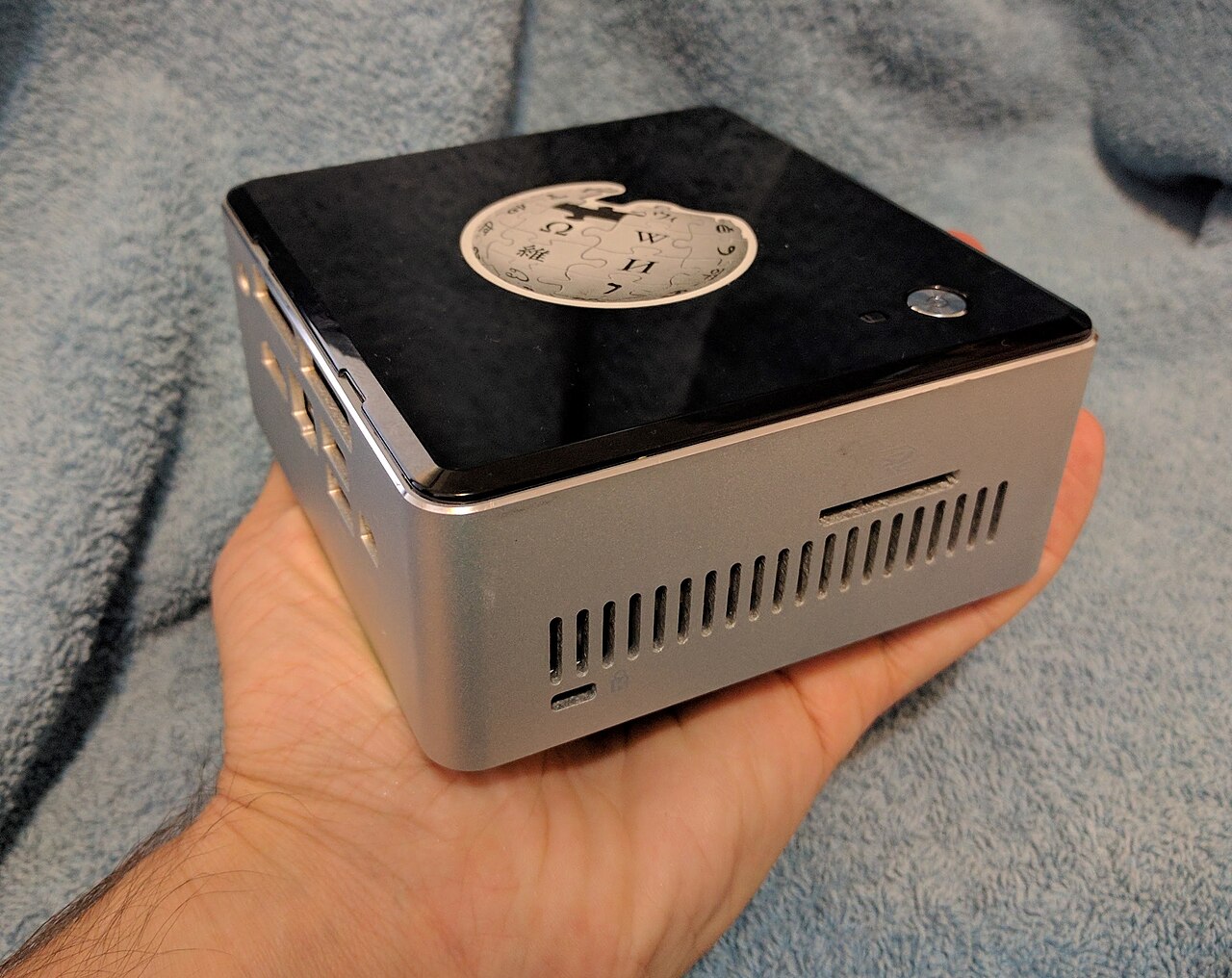
Kiwix is easiest to describe as "Wikipedia offline," but that phrase is too small for the engineering idea. The real project is an offline knowledge stack: a file format, a reader family, command-line tools, catalog infrastructure, build pipelines, hotspot images, and a distribution habit designed for places where the network is expensive, fragile, filtered, or simply absent.[1][2][5]
That is why Kiwix is still interesting in 2026, even for engineers who live inside cloud dashboards. Most modern software assumes the network is the default substrate and treats offline mode as a degraded cache. Kiwix reverses the premise. It asks what has to be true if the library itself must travel first and the network may never arrive. The answer is not one heroic app. It is a set of boring interfaces that let content be compressed, moved, indexed, searched, served over HTTP, copied to phones, and shared from a small local box.[1][2][3][4]
As of 2026-06-05T08:02:43Z UTC, the public Kiwix catalog explains the project in those practical terms: online resources are compressed into ZIM files, downloaded, and then read on devices through Kiwix apps; the catalog includes Wikipedia, Project Gutenberg, TED, MedlinePlus, Stack Exchange-style material, and other learning resources rather than a single encyclopedia lane.[1] The architectural signal is that Kiwix treats knowledge as a portable artifact, not as a session against a remote website.
The file is the product boundary
The center of Kiwix is the ZIM file. A ZIM is not merely a zip full of pages. In the openZIM ecosystem, it is the packaging boundary that lets a reader open a large website-like corpus without asking a server for every article. libzim, the reference implementation, describes itself as a C++ library for reading and writing ZIM files across systems and architectures, and it lists compression, ICU, Zstandard, and optional Xapian search as part of the build surface.[4] That dependency list is revealing: this is not a static-document viewer. It is a compressed, searchable, multilingual archive runtime.
Kiwix's catalog turns that technical boundary into user-facing choices. For Wikipedia files, the catalog explains three variants: mini for introductions and infoboxes, nopic for full text without images, and maxi for the default full version.[1] Those labels are not cosmetic. They expose the real constraint of offline software: storage and transfer budgets are product features. A school with a shared hotspot, a clinic with intermittent backhaul, and a phone user with a small SD card may all want "Wikipedia," but they do not have the same budget for images, language coverage, update frequency, or disk space.
That makes Kiwix different from many content projects. It does not only curate material. It gives operators a vocabulary for the tradeoff between completeness and deployability. If an 80 GB corpus is too heavy, the right answer may not be "wait for better bandwidth." It may be a nopic file, a smaller language edition, a subject-specific collection, or a hotspot that multiple users can share locally.[1][2][6]
The stack has more than one reader
The project would be much less useful if ZIM files were tied to one desktop application. The Kiwix hub maps a wider surface: reader downloads, the web/PWA reader, kiwix-tools, Kiwix Hotspot, Kiwix Imager, download mirrors, the catalog, and creation tools such as WP1, Nautilus, Zimit, and several *2zim converters.[2] That map is the clearest reason to treat Kiwix as infrastructure rather than an app.
kiwix-tools shows the server-side path in a compact way. Its repository defines a small command-line toolkit: kiwix-manage for XML-based libraries of ZIM files, kiwix-search for full-text search, and kiwix-serve as an HTTP daemon for serving ZIM files.[3] That matters because offline reading often becomes local-network reading. A classroom, library, ship, clinic, disaster-response site, or workshop may not need every device to hold every archive. It may need one local machine to serve a known content set to nearby laptops and phones.
This is the boundary where Kiwix becomes operationally legible. A team can choose between device-local reading, a browser-based reader, a local HTTP service, or a prebuilt hotspot. That range lets the same content artifact move through different deployment shapes without rebuilding the entire project for each environment.[2][3][6]
The cost is that operators must think like librarians and sysadmins at the same time. They need to decide what content belongs in the local library, how often it should be refreshed, whether images are worth the space, who can add local material, and how users will find the hotspot. Kiwix does not erase those decisions. It makes them explicit enough to be planned.
Creation is part of the architecture
Offline projects fail when they are only download mirrors. The harder question is how new archives are made. Kiwix's public hub lists a creation side as well as a reading side: WP1 for building ZIMs from Wikimedia selections, Nautilus for local files, Zimit for arbitrary websites, mwoffliner for MediaWiki scraping, gutenberg2zim, openedx2zim, kolibri2zim, phet2zim, and Zimfarm for automated builds.[2] That breadth matters because "offline knowledge" is not one content source. It is an ingestion problem.
The Kiwix catalog makes the same point in user-facing language. It offers a way to request resources, describes Zimit as a route for converting a website into a ZIM, and points Wikimedians to WP1 for arbitrary article selections, projects, or SPARQL-based collections.[1] In other words, the stack is not locked to a single upstream editorial decision. It has tools for curated subsets, institutional collections, and local priorities.
That design is especially important for public-interest deployments. A rural school may need Wikipedia plus textbooks, maps, health information, and local language material. A clinic may need MedlinePlus and carefully selected medical resources. A museum may want a small offline guide built from its own collection pages. If the architecture only supported "download the global encyclopedia," it would miss the way offline environments actually work.[1][2][6]
The maintainability risk is obvious: every converter is a moving target because websites change. But the openZIM approach at least gives the ecosystem a shared target format. Instead of every offline project inventing its own archive reader, scraper output can converge on ZIM, and reader improvements can benefit many content sources at once.[2][4]
The real deployment is a local social object
The Internet-in-a-Box project makes Kiwix's field logic easier to see. Its homepage describes learning hotspots used in dozens of countries and says the box works without internet by wirelessly serving nearby users on phones, tablets, or laptops.[6] It also points to a Raspberry Pi route, open-source IIAB software, installable content packs, and Kiwix as one of the online libraries from which content can be drawn.[6]
That is the part cloud-native engineers can miss. Offline knowledge is not just a storage format; it is a social deployment. A box in a classroom changes who controls the library, who can browse without metered data, who can keep learning during outages, and who can add community material. Internet-in-a-Box even frames local photos and artifacts as part of the deployment, which is a useful reminder that offline infrastructure should not only import canonical knowledge from elsewhere.[6]
The Wikimedia Foundation's older interview on Kiwix captured the same access problem from the institutional side: offline access matters when people have limited or infrequent internet, and Kiwix is open-source software for downloading web content for offline reading.[5] That framing still holds. The project is not a nostalgia play for a pre-web era. It is a practical answer to the unevenness of the web itself.
Where Kiwix fits
Kiwix is strongest when the problem is bounded but serious: make a known body of knowledge usable without depending on live connectivity. That can mean schools, clinics, prisons, ships, field stations, emergency kits, low-bandwidth communities, personal reference libraries, or developer documentation carried into an air-gapped environment.[1][2][6]
It is weaker when the problem requires live collaboration, fresh transactional data, personalized feeds, or constantly changing dashboards. A ZIM file is an artifact. That is its strength and its limit. It gives you portability, compression, local search, and stable access; it does not make stale content fresh or solve the governance question of what should be included.[1][4]
The adoption pattern should therefore start with content boundaries, not hardware. Pick the audience, language, storage budget, freshness requirement, and local serving model first. Then choose the Kiwix reader, kiwix-serve, a hotspot image, or an Internet-in-a-Box deployment path. If the team cannot name the corpus and refresh cadence, it is too early to argue about the device.
The open-source signal is clean: Kiwix matters because it turns offline access from an afterthought into an architecture. ZIM files define the artifact. Readers make it portable. kiwix-tools makes it servable. Catalog and build tools make it renewable. Internet-in-a-Box shows how the stack becomes a local public resource. That is a useful reminder for the rest of software: sometimes resilience starts by making the network optional.[1][2][3][4][6]
Sources
- Kiwix, "Catalog" - official overview of offline content, ZIM packaging, Wikipedia variants such as mini/nopic/maxi, Zimit, WP1, and catalog scope.
- Kiwix Hub - official map of readers, creation tools, ZIM specification links, catalog services, Kiwix Hotspot, Kiwix Imager, mirrors, and related openZIM projects.
- GitHub,
kiwix/kiwix-tools- command-line Kiwix tools includingkiwix-manage,kiwix-search, andkiwix-serve, plus build and license notes. - GitHub,
openzim/libzim- reference implementation of the ZIM specification, read/write library role, dependencies, platform scope, and release metadata. - Anne Gomez, "The future of offline access to Wikipedia: The Kiwix example," Wikimedia Foundation, October 2, 2017 - independent institutional context on Kiwix, offline access, and limited-connectivity users.
- Internet-in-a-Box, project homepage - learning hotspots, offline local Wi-Fi serving, Raspberry Pi installation path, content packs, open-source software, and community deployment framing.
- Wikimedia Commons, "Internet-In-A-Box.jpg" - 2017 photographic image by James Heilman, MD, showing an Internet-in-a-Box device.