A planet can be above the horizon and still be behind the neighbour's roof. Stellarium, the free, open-source desktop planetarium, becomes especially useful when an observer starts asking questions at that scale: where to stand, when to look, and how much sky will fit through an eyepiece. Its adjustable time, landscapes, and optical views let an evening take shape before a telescope leaves the house.[1][3]
The project is available for Windows, macOS, and Linux, with its source code published under the GNU General Public License.[1][5] It remains actively developed: the 26.3 release, announced on 28 September 2026, added an Object Visibility plugin alongside changes to existing plugins, sky cultures, and the interface.[2] For someone encountering Stellarium now, the most rewarding introduction is a small observing problem carried from the screen to the garden.
Put the observer in the right place
Imagine planning a first look at a planet from a back garden. This is an illustrative exercise, not a report of a particular night's sky. The initial task is to tell the program where that garden is.
Stellarium's Location window, opened with F6, accepts a city selection or coordinates. Its initial network lookup estimates location from an IP address, so checking the result matters. The Date and Time window, opened with F5, lets the observer choose the planned evening. Locations in the program's database carry time-zone information, with separate controls for daylight saving and custom time zones.[3]
Those settings make a simple question answerable: what will be in this direction when the observer is actually free to go outside? Advancing simulation time lets the plan change while there is still daylight to move the tripod. A useful rehearsal should have a stated place and clock time; otherwise, two people can discuss the same object while looking at different simulated skies.
There is a documented teaching version of this sequence. A University of Iowa astronomy lab asks students to use Stellarium to identify planets above the horizon during the session, record their celestial coordinates, and prepare a finder chart. The instructions then take the students to the roof for observations.[6] The chart gives them something specific to locate and compare with the sky.
The landscape is another setting
A city selection does not reconstruct every tree and roof around the observer. Stellarium handles the surrounding landscape separately, and the user guide makes the distinction explicit: the location associated with a panorama can differ from the location selected for the sky calculation. Enabling Location from landscape makes choosing a landscape update the observer's position too.[3]
This is an easy detail to overlook because the result can look convincing either way. A familiar-looking foreground does not establish that the sky is being calculated for the place where the photograph was taken. For a shared observing plan, checking both settings is a small step with a large practical payoff.
The project accepts custom landscape packages as ZIP files through Add/remove landscapes, in the Landscape tab of the F4 viewing-options window. Contributors are asked to include longitude, latitude, altitude, and planet in landscape.ini.[4] The guide explains how photographic panoramas and measured horizon outlines can represent a particular site.[3]
For our garden example, that creates a useful next step: build a landscape that places the roof where it belongs, then watch the target's path against it. The accuracy of that rehearsal depends on how well the panorama or horizon has been measured and aligned. Choosing an attractive panorama from somewhere else would leave the original obstruction question unanswered.
A club that repeatedly uses the same observing field could share this site description. That is a practical inference from the landscape format: local knowledge can travel with the setup, instead of depending entirely on somebody remembering which corner has the clearest view.
Make the eyepiece part of the rehearsal
Finding a target in the whole sky and recognising it through a telescope are different tasks. Stellarium's Oculars plugin helps connect them by modelling combinations of telescope, eyepiece, and auxiliary lens. It also supports binoculars, camera framing, and a Telrad-style sight for planning movements between recognisable stars.[3]
The settings are concrete. Telescope entries include focal length and aperture; eyepiece entries include focal length and apparent field of view. Horizontal and vertical flip controls let the simulated orientation reflect the optical arrangement.[3] Entering the equipment actually available makes the preview useful for judging how much of the surrounding star pattern will remain in view.
For a beginner, that can change the plan before the first attempt. A target that is obvious in a broad sky view may become difficult to recognise when the nearby reference stars fall outside a narrow field. Comparing eyepiece configurations offers a way to prepare the search and anticipate the change in scale.
Independent observers have valued that preparation too. In his introduction for BBC Sky at Night Magazine, published online in 2020, astronomy writer Will Gater singled out Oculars as especially useful for planning astrophotographs.[8] The appeal is practical: equipment choices can be explored while there is still time to revise them.
The guide also describes the limits of that comparison. The plugin can set a stellar-magnitude limit from telescope diameter, but the appearance of stars also depends on optical quality and atmospheric seeing, among other factors. Its authors explicitly describe the simulation as a supplement to hands-on experience.[3] A plausible framing preview still leaves the observer to discover what the equipment and conditions will reveal.
Leave room for the actual night
Stellarium lets users adjust light pollution, including manual settings and input from a Sky Quality Meter. These controls make the assumed sky brightness visible and changeable.[3] They invite a productive habit: when a simulated view seems unusually generous, inspect the conditions behind it before filling an observing list with faint targets.
For a first evening, my suggestion is to prepare one target and a few nearby reference stars, check the selected location and time, and compare the plan with the actual horizon. An individual can begin with that small exercise. A club sharing plans should also agree on the landscape and equipment settings, so members understand what a screenshot assumes.
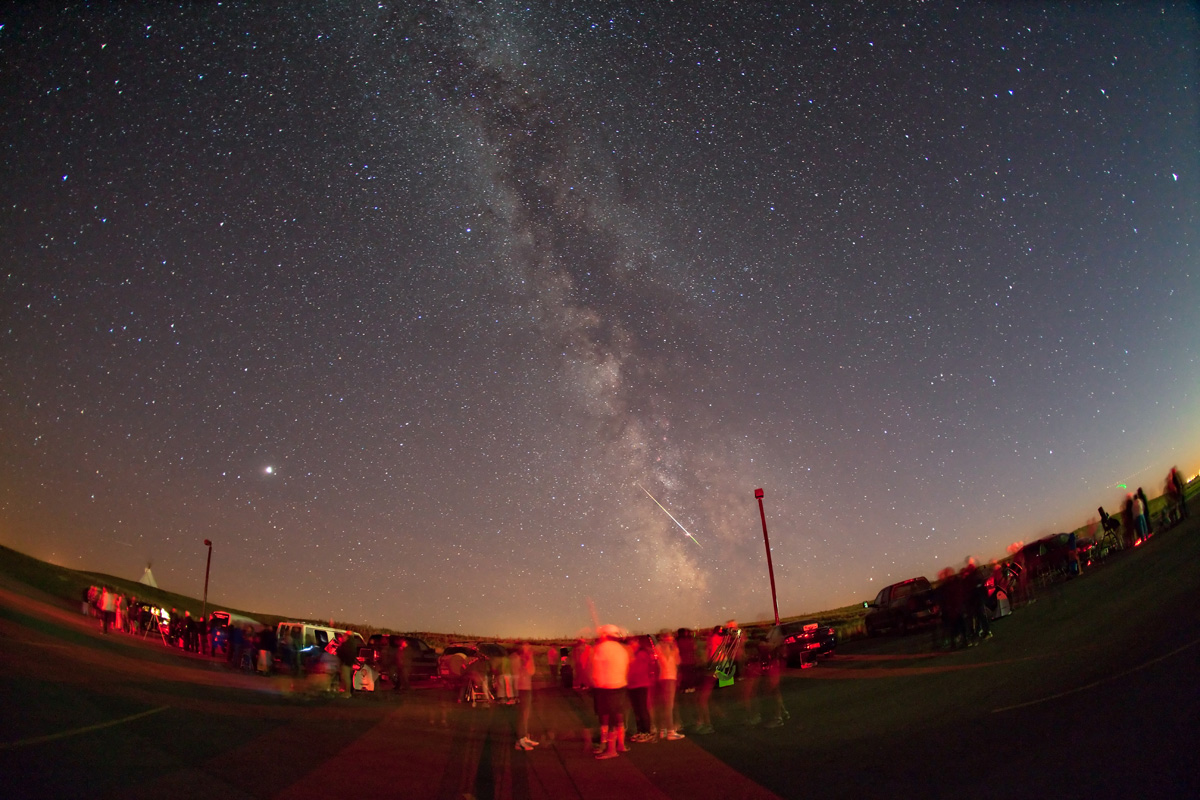
The archival photograph accompanying this article shows a real gathering under rural Alberta skies in September 2009; the IAU records that participants heard Siksika stories of the Milky Way before observing it.[7] It captures the destination of all this preparation: people looking up together. Stellarium is at its most useful when the screen makes that next act of looking easier.
Sources
- Stellarium project, official homepage — desktop platforms, open-source planetarium, time controls, landscapes, and ocular simulation.
- Stellarium project, “Stellarium 26.3,” 28 September 2026 — release announcement and addition of the Object Visibility plugin.
- Georg Zotti and Alexander Wolf, editors, Stellarium 26.3 User Guide — sections 4.1–4.2, 4.4.1, 4.4.5, chapter 7, and section 16.1 on time, location, sky brightness, landscapes, and Oculars.
- Stellarium project, “Stellarium Landscapes” — installing landscape ZIP packages and supplying location metadata in landscape.ini.
- Stellarium project, official source repository — application source, supported platforms, and GPL licensing.
- University of Iowa, “Part 2: Observing Planets,” Imaging the Universe — independent teaching instructions linking Stellarium preparation, finder charts, and rooftop observations.
- International Astronomical Union, “Star Party,” photograph by Alan Dyer — southern Alberta, 12 September 2009; image provenance and event description.
- Will Gater, “How to install and use Stellarium astronomy software,” BBC Sky at Night Magazine, 17 July 2020; originally published June 2018 — independent assessment of Oculars for observing and photographic planning.