Imagine a garden thermometer whose indoor display has stopped working. The outdoor sensor may still be transmitting. rtl_433 offers another route to its readings: a compatible radio receiver supplies samples, signal processing extracts timed pulses, and a device decoder turns bits into named measurements. Following those stages explains both the satisfying moment when a temperature appears and the quieter puzzle when nothing does.[1]
The open-source program supports RTL-SDR and SoapySDR receivers. Its name understates its frequency range: the project also handles devices using bands around 315, 868 and 915 MHz, among others.[2] This article follows one narrower example, a Nexus temperature-and-humidity protocol, through the source revision linked below. Its timings and checks belong to that protocol; other sensors need their own decoding rules.
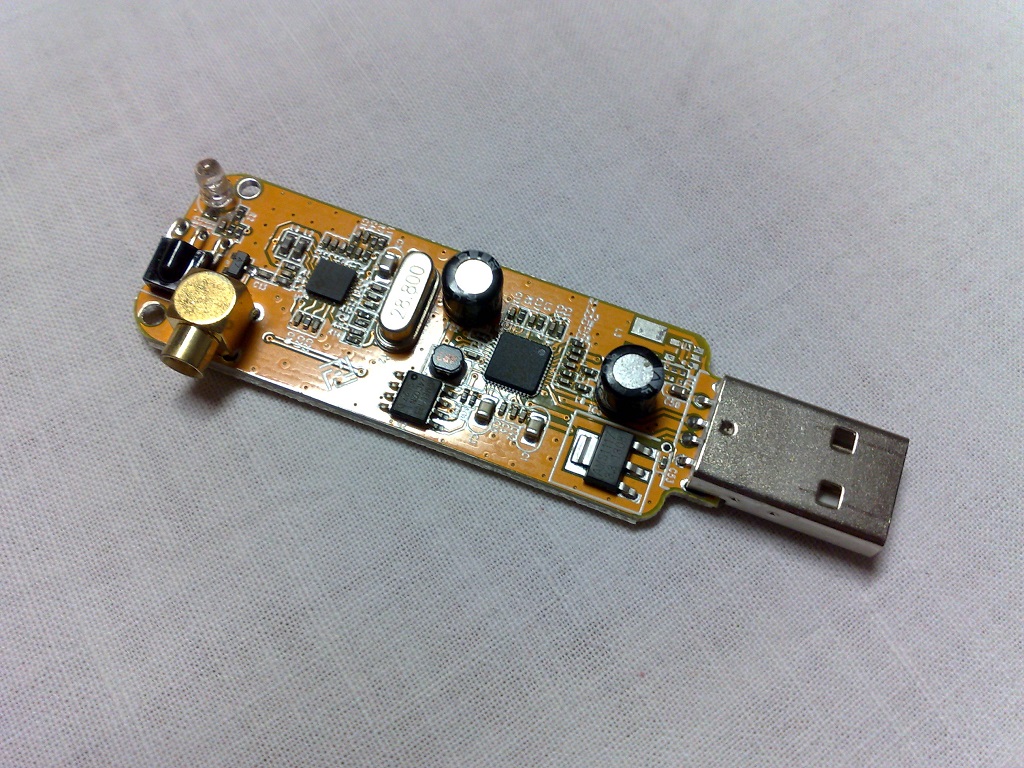
Hearing a burst
For a supported sensor transmitting near 433.92 MHz, an installed receiver and working drivers, a first listening command can be explicit about its assumptions:
rtl_433 -f 433.92M -s 250k -F json
Here -f selects the center frequency, -s sets the sample rate, and -F json requests machine-readable output. Those frequency and sample-rate values are also the documented defaults. They are a starting configuration for this example, rather than a promise of compatibility with every weather station.[2]
The receiver input and the eventual output occupy opposite ends of the program. Between them are demodulation, pulse detection, slicing and device decoding. rtl_433 can also load recorded samples through that processing path, making the input replaceable without changing the question asked of the signal.[1]
That separation helps localize a failure. An empty JSON stream establishes that no decoded event reached that output. It leaves several possibilities open: no useful radio signal, timings that failed to become usable bits, or bits rejected by the enabled decoders. Each stage needs different evidence.
The gaps become bits
The Nexus protocol documents pulses approximately 500 microseconds long. The gap afterward carries the distinction: roughly 1,000 microseconds represents zero, while roughly 2,000 represents one. Its messages contain 36 bits and are transmitted repeatedly.[4]
The relevant slicer, pulse_slicer_ppm(), works with measured gaps. It converts the decoder's timing parameters into sample counts, assigns gaps to the zero or one ranges, and collects the resulting bits in a bitbuffer_t. Larger separations can start another row or finish the message. This is where a sequence of durations becomes something a protocol decoder can inspect.[5]
At this stage the program has a candidate bit pattern. A temperature still requires a field layout and rules for accepting that pattern. The slicer has answered a timing question; the next function asks whether the result resembles a particular device's message.
In nexus_decode(), the first test looks for a 36-bit row repeated at least three times. Further checks examine length, a fixed four-bit pattern and channel values. The code explicitly notes that this protocol lacks a real checksum. It also filters some messages that resemble a related protocol and rejects implausible humidity values. After acceptance, a signed temperature field is scaled into degrees Celsius and passed onward through decoder_output_data().[4]
These checks explain why reception and recognition are separate achievements. A visible burst can fail validation; an accepted message has passed the decoder's particular tests. Neither outcome, on its own, tells us whether the thermometer is accurately measuring the air around it.
Keep the transmission you cannot explain
rtl_433's analysis guide recommends capturing undecoded signals with -S unknown and recording the corresponding values shown on the sensor's display or head unit. The -A analyzer exposes pulse timing, while a flexible decoder configured with -X lets an investigator try a proposed encoding.[6]
That makes an unfamiliar sensor a sequence of smaller questions. Is there a transmission at the expected frequency? Does the demodulator recover a coherent sequence of timings? Can those timings yield repeatable bits? Which changing bits track the displayed temperature? The guide follows that progression from radio reception through timing analysis to field interpretation.[6]
A saved transmission also makes a bug discussable. Another contributor can replay the same sample instead of waiting beside the same thermometer. The contribution guide asks for recordings across different conditions, descriptions of the expected measurements, and device identification. It directs contributors to the separate rtl_433_tests repository, whose recordings also help catch regressions.[7]
The useful contribution is therefore larger than a decoding function. A recording paired with a known reading gives someone else a way to challenge the interpretation. Several recordings with changing values make that challenge stronger.
Give the reading a home
Once decoding succeeds, JSON or MQTT can carry the event into another application.[1] The field conventions preserve distinctions worth keeping: temperature_C names the unit, time records when the message was received, and model, id and sometimes channel help distinguish devices. The documentation warns that an ID may change when power or batteries are replaced.[8]
A household logger consequently needs a maintained association between a decoded device and a physical place. “Garden” is knowledge supplied by the owner. After a battery change, it is worth confirming that the stream still maps to the intended sensor. A display of the latest value also benefits from showing its age: an old reading cannot establish present conditions.
The appeal of using ordinary weather sensors this way has a history. In 2022, Hackaday covered a home-monitoring project built around rtl_433, highlighting the reuse of commercial sensors and the care taken to register their locations.[9] The architecture explains how that reuse becomes possible. Radio samples, bit patterns and measurements remain distinct objects, with a place to investigate each transformation. The little thermometer can acquire a new audience—and its readings can keep a trail back to what was actually received.
Sources
- rtl433, “Basic rtl433 operation” — input, processing, decoder and output stages; recorded inputs, JSON and MQTT; revision f35183aaf1d2, consulted November 8, 2026.
- rtl_433, README — supported receiver families, frequency bands and command-line options; revision f35183aaf1d2.
- Dsimic, “DVB-T USB dongle with RTL2832U and R820T,” August 3, 2015 — original photograph and hardware identification, Wikimedia Commons, CC BY-SA 4.0.
- rtl_433, src/devices/nexus.c — protocol timing, repeated-row validation, sanity checks and measurement extraction; revision f35183aaf1d2.
- rtl433, src/pulseslicer.c — pulseslicerppm(), timing conversion, bit accumulation and row boundaries; revision f35183aaf1d2.
- rtl_433, “Capture and analyze devices” — signal capture, pulse analysis, flexible decoding and comparison with known readings; revision f35183aaf1d2.
- rtl_433, “Contributing guidelines” — sample recordings, expected measurements, device descriptions and regression testing; revision f35183aaf1d2.
- rtl_433, “JSON Data fields” — reception timestamps, device identity, channels and measurement units; revision f35183aaf1d2.
- Maya Posch, “Connecting Commercial 433 MHz Sensors to MQTT and Home Assistant with RTL-SDR,” Hackaday, December 26, 2022 — independent coverage of a home-monitoring project, used for historical context.