The most useful way to understand OpenScan is to begin with what does not come out of it. The machine does not sweep a laser over an object and emit a dimensioned surface. It moves a small object through a planned set of viewpoints, controls a camera and light, and produces photographs. Photogrammetry software later tries to infer camera positions and three-dimensional structure from features that recur across those photographs.[4][5]
That boundary is not a disclaimer attached to the project; it is the reason the project is interesting. OpenScan turns the fussy physical part of small-object photogrammetry—repeatable movement, even illumination, camera triggering, and image collection—into an inspectable capture system. Its firmware and printable mechanical files are public, although the project's own clarification says the optional cloud service and production-ready PCB files are not. “Open” must therefore be read component by component, not stamped across the whole workflow.[1][3][9]
The resulting image set can cross into a hosted or local reconstruction workflow. A user can replace the camera, print a different frame, choose another reconstruction engine, or keep the raw photographs as the durable capture artifact.[1][3][8]
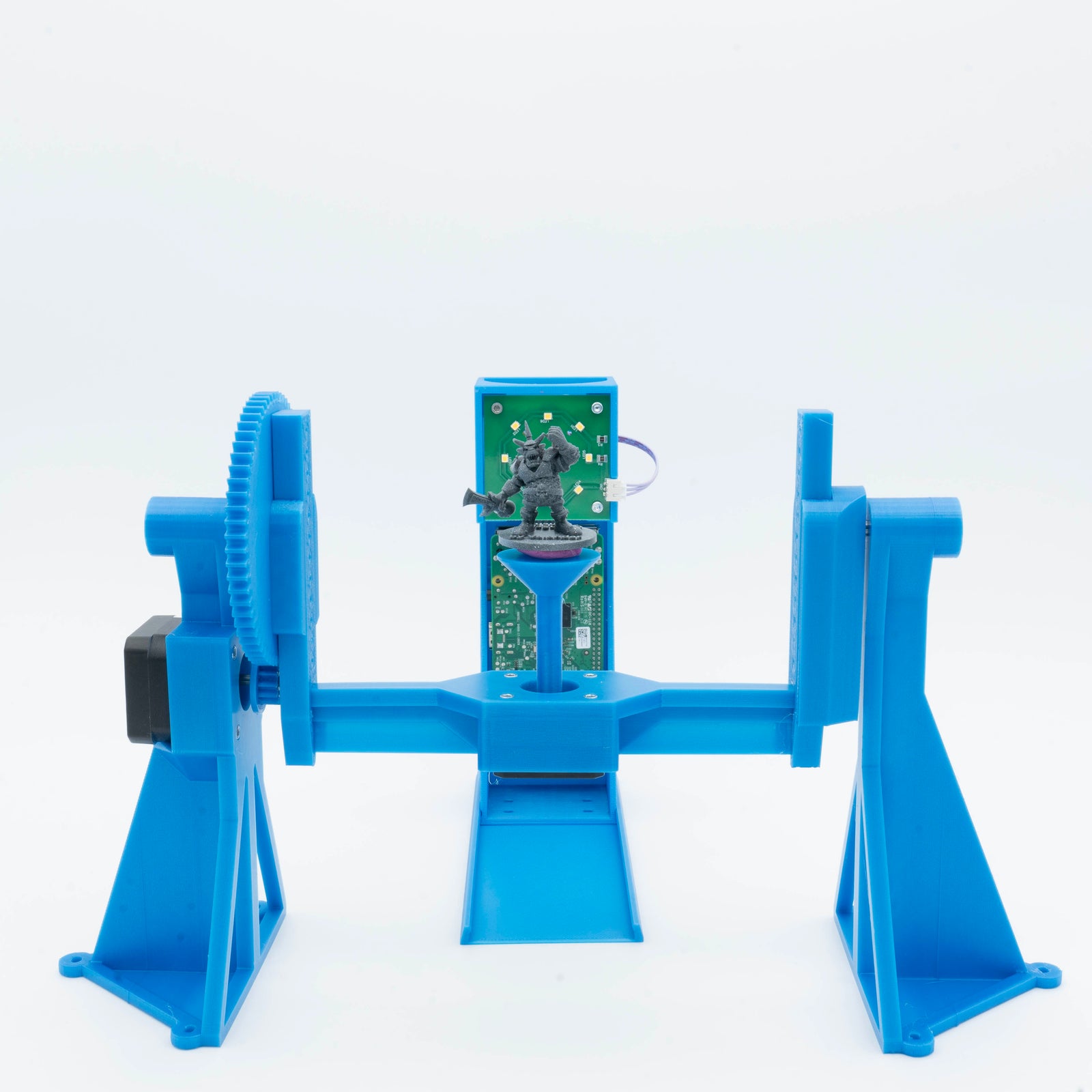
The cover photograph shows an OpenScan Classic rather than an abstract “3D scanning” graphic. Its exposed gears, printed supports, turntable, circuit board, and test object are the architecture. OpenScan's current product page describes a working volume of roughly 17 centimetres per side, support for a Raspberry Pi camera, many USB-controlled DSLRs, and—with more tinkering—other cameras triggered through a remote release.[2] This is a bench instrument whose capture architecture is physical enough to see.
Two motors buy coverage, not truth
The Classic build uses two NEMA 17 stepper motors: one drives the turntable and the other changes its angle relative to the camera. A Raspberry Pi and Pi Shield coordinate those motors, a ring light, and the camera. The official bill of materials calls for a microSD card larger than 16 GB and lists the autofocus Arducam IMX519, older Pi camera modules, and supported DSLRs as capture options; the frame and gears are available as printable files.[3]
From a browser on the same network, the operator selects a scanner and camera configuration, previews the object, adjusts light and framing, and starts a routine. The documented first-dataset range is 50–100 photographs.[4] Automation matters because photogrammetry rewards overlap and consistent exposure. A tired person hand-holding a camera tends to vary distance, miss the underside, cast shadows, or stop before adjacent views share enough detail. The rig makes those mistakes less likely by turning coverage into a repeatable motion sequence.
But repeatable motion is not a measurement by itself. A stepper count tells the rig where it tried to move; it does not prove that every photograph is sharp, the object stayed seated, the printed gear had no play, or the camera saw enough stable texture. Nor does a larger photo count rescue a bad set. One hundred images with glare moving across a polished surface can provide less usable correspondence than a smaller, sharp set of a textured stone.
This is the first adoption boundary: OpenScan automates capture geometry, not the truth of the reconstructed geometry. A serious workflow still inspects focus and exposure, preserves the original photos, tests repeatability, and compares the result with a known dimension or reference object.
The surface is part of the input
Photogrammetry needs features that can be recognized from one view to the next. OpenScan's own practical guide describes the ideal surface as having thousands of distinct, random, high-contrast features with no specular highlights or blurred areas. Wood grain and textured stone can work naturally. Plain plastic, shiny metal, transparent material, and glossy paint are harder because a matcher may see too little stable information—or may mistake view-dependent reflections for features on the object.[5]
The rig's lighting system addresses only part of that problem. Cross-polarization can suppress glare, but doing so may reveal that an apparently detailed plastic surface is actually almost uniform. The documentation then demonstrates a removable scanning or chalk spray that adds a fine random pattern for the reconstruction software to follow.[5]
That intervention has consequences. Spraying a replaceable machine part may be harmless. Coating a painted miniature, archaeological surface, forensic object, food specimen, or delicate collection item may be unacceptable. Rotation can also be disallowed when an object is unstable or must retain an evidentiary orientation. The inspectable design cannot remove those domain constraints. It makes them easier to locate: if the object cannot be handled, textured, illuminated, or rotated safely, this particular capture method may be the wrong one.
The mesh lives beyond the machine
After capture, the important output is a set of overlapping images. Reconstruction software detects features, matches them across views, estimates camera poses, builds a sparse and then denser representation, and derives a mesh and texture. An independent Hackaday walkthrough describes the same division: OpenScan supplies highly controlled source photographs, which can be sent to the optional OpenScan Cloud service or processed in software such as Meshroom.[8]
Keeping this handoff explicit prevents a common procurement mistake. “Open-source scanner” does not mean that every convenient end-to-end path is local, open, free of service limits, or operationally owned by the user. OpenScan publishes GPL-licensed firmware, printable mechanical designs, and wiring information, while its own project note describes OpenScanCloud as closed source and says manufacturing-ready PCB files are withheld. The cloud is optional and the photo sets can feed other tools, but a hosted reconstruction path is still a dependency with its own availability, privacy, queue, and sustainability questions.[1][8][9]
For a hobbyist scanning a model, cloud processing may be the simplest route. A museum, lab, repair shop, or company handling confidential parts may instead require local processing and a documented retention policy. That choice moves the cost rather than erasing it: local photogrammetry can demand substantial compute, storage, tuning, and operator time. The portable contract is the image set, not the promise that two reconstruction engines will produce identical meshes.
Scale is another downstream responsibility. OpenScan's quality documentation is unusually direct: ordinary photogrammetric models do not inherently arrive at an accurate absolute scale. The project scales examples using a reference measurement or registration in CloudCompare, and notes that known camera positions or markers can supply other scale information.[6] A visually convincing model can therefore still be dimensionally wrong. Anyone making a replacement part or reporting measurements should validate axes and distances against a traceable reference instead of treating surface detail as proof of metrology.
Published hardware still has versions
“OpenScan” names an ecosystem rather than one frozen appliance. The project's current GitHub overview distinguishes OpenScan Mini and Classic v1 hardware maintained by openscan.eu from community variants, and warns that their parts are not all cross-compatible. It also labels OpenScan2 as the stable firmware shipped with kits and OpenScan3 as a beta under active development.[1]
That distinction matters more than the appeal of the newest branch. OpenScan3's own README calls it a hackable, extensible foundation for standard and custom photogrammetry rigs, but also says it is under development and not ready for production. Its recommended image is selected by camera variant, and the warning is blunt: choosing the wrong camera image may damage hardware.[7]
An adopter should therefore record a complete, reproducible combination: frame revision, printed-part set, shield, motor drivers, camera and lens, polarizer, firmware image, configuration, reconstruction engine, and calibration object. “Built an OpenScan” is not enough for a lab notebook or a support request. The published files make repair and modification possible; they do not make every remix equivalent.
The maintenance signal is encouraging but bounded. Stable firmware exists, the organization names which hardware it supports, and the next-generation code is public before it is declared production-ready.[1][7] The practical response is not to avoid the project. It is to use the stable lane for dependable scanning and evaluate the beta lane on a spare image and noncritical hardware when its extensibility solves a real problem.
Put one honest object on the bench
The best first trial is neither a glossy showpiece nor the object that justifies the purchase. Start with a small, matte, richly textured object that fits comfortably inside the capture volume, plus a reference dimension that can be checked with calipers. Save the untouched photo set. Run one reconstruction, scale it from the reference, inspect holes and doubled surfaces, then repeat the capture after removing and replacing the object. The difference between the two meshes says more about the workflow than the prettiest screenshot.
Next, test the difficult object class the project would actually face: a monochrome printed part, polished fastener, miniature with deep occlusion, or item that cannot be sprayed. Record which intervention made it work—polarization, surface treatment, camera change, extra angle—or whether it remained a bad fit. This exposes the cost hidden behind the word “scan”: preparation, capture, reconstruction, cleanup, scaling, validation, and safe handling.
OpenScan fits makers, conservators, educators, small labs, and repair workflows that value inspectable mechanics, replaceable components, and ownership of the source images. It is weaker when the requirement is certified dimensional inspection, unattended production throughput, instant capture of moving subjects, or non-contact handling of surfaces that defeat photogrammetry. Those are not documentation failures. They are boundaries between an adaptable camera robot and other classes of instrument.
The project's strongest idea is consequently modest and durable. It does not pretend that a printed frame can make reconstruction automatic or measurement trustworthy. It gives the photographs a disciplined way to happen—and leaves enough of the system open that the operator can decide what should happen to them next.
Sources
- OpenScan organization on GitHub — maintained and community hardware variants, firmware status, compatibility warning, documentation, and repository map.
- OpenScan, “OpenScan Classic” — current product photograph, capture volume, camera options, browser control, printable parts, and qualified accuracy claims.
- OpenScan documentation, “OpenScan Classic” — bill of materials, two-motor mechanism, Pi Shield, camera connections, assembly, and printable design files.
- OpenScan documentation, “Firmware usage” — local interface, scanner and camera selection, lighting and crop controls, and the recommended first photo set.
- OpenScan documentation, “Photogrammetry basics” — feature, glare, focus, surface-treatment, lighting, and cross-polarization constraints.
- OpenScan documentation, “3D scan quality” — absolute-scale limitation, reference scaling, mesh examples, and camera comparisons.
- OpenScan contributors, “OpenScan3” — development status, installation paths, camera-image warning, local web interface, API surface, and GPL-3.0 license.
- Donald Papp, “Watch The OpenScan DIY 3D Scanner In Action,” Hackaday, February 19, 2024 — independent account of the capture workflow, small-object boundary, and reconstruction options.
- Thomas Megel, “Is OpenScan an open-source project?”, OpenScan Blog, February 26, 2024 — component-by-component clarification of firmware, printable designs, PCB materials, and the closed-source optional cloud service.