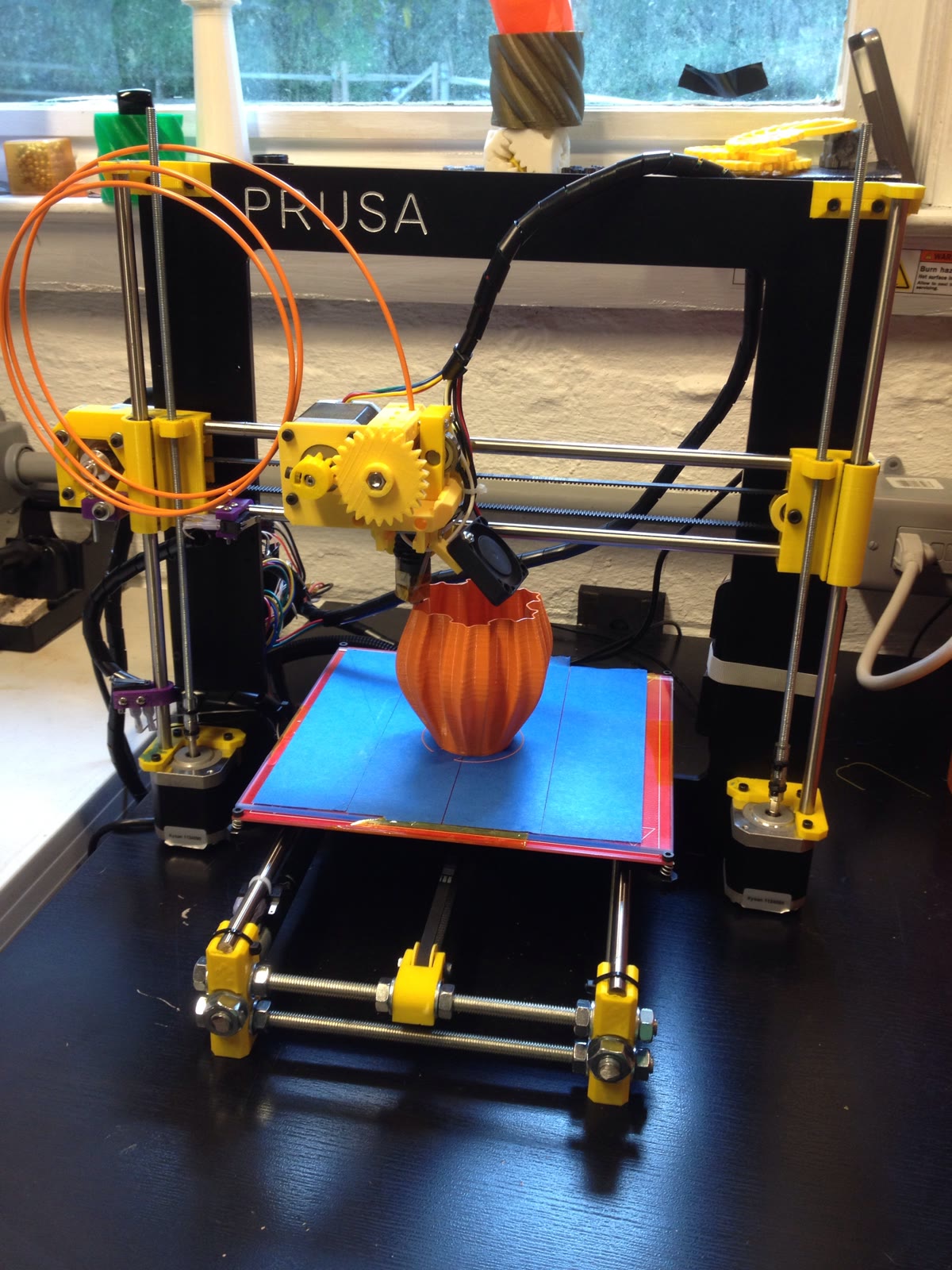
In the conventional USB-serial setup that made OctoPrint ubiquitous, a desktop 3D printer already has a brain. Its controller board runs firmware that reads G-code, plans motion, times stepper pulses, samples temperature sensors, drives heaters, and watches endstops. OctoPrint does not evict that firmware. It adds a second computer beside the printer and gives the machine a control room: file custody, job state, a browser interface, camera monitoring, automation hooks, and a record of the conversation over the printer connection.
That boundary is the best way to understand the project. In its typical workflow, OctoPrint receives pre-sliced G-code; it is not itself the slicing engine or replacement printer firmware, and it is more consequential than a wireless upload button. It is a host-side service that turns a long, opaque print into an observable session. The project recommends OctoPi, a Raspberry Pi image maintained by Guy Sheffer that packages OctoPrint with its dependencies and camera-streaming support; the same application can also run on other systems that support its Python stack.[1] Creator Gina Häußge has described the original 2012 problem in simpler terms: she wanted the noisy printer out of her office without losing temperature, progress, and visual feedback.[11]
The timing makes this old distinction newly useful. OctoPrint 1.11.8 was released on the stable line on June 23, 2026, while 2.0.0rc4 arrived on July 14 as an explicitly unstable release candidate.[14][10] The major-version work turns printer connections into a plugin boundary instead of assuming that every machine speaks through the same serial path.[9] Before asking whether to test 2.0, however, it is worth seeing what OctoPrint has always owned—and what it deliberately leaves in the printer.
The cover photograph makes that split unusually clear. It shows a RepRap Prusa i3 building an orange vase in 2013, and its archival description says the printer was powered by OctoPrint.[12] There is no dashboard in the frame. What matters is the physical machine continuing its hours-long work while a separate host maintains the job and feedback channel.
Four layers, four different jobs
Start upstream. A CAD model becomes G-code in a slicer. OctoPrint stores that job file, selects it, starts or pauses the print, reports progress, and exposes those actions to a browser or client. Its REST interface makes the division concrete: POST /api/job accepts commands such as start, pause, cancel, and restart, while the job endpoint reports the selected file and current state.[3] Those are orchestration verbs. They do not describe how a motor reaches the next coordinate.
Below the API, OctoPrint's own developer documentation separates PrinterInterface from a deeper communication layer. Plugins are expected to use the interface, which exposes connection state, temperatures, job data, homing, tool changes, and callbacks, rather than reaching directly into transport details.[2] That abstraction is why a notification plugin can react to a completed job without becoming a serial-protocol implementation, and why a client can display “Printing” or “Offline after error” without parsing every raw line itself.
Then comes the connection. On the stable line, that is usually USB serial. OctoPrint sends commands, listens for acknowledgements and capability reports, observes temperatures, handles resend requests, and decides when silence means the printer is no longer healthy. The default config.yaml reveals how much engineering hides behind “connected”: automatic port and baud-rate detection, a 30-second ordinary communication timeout, separate busy and temperature intervals, five consecutive timeouts permitted while printing, five failed write passes before disconnection, and command lists for blocking or emergency handling.[4]
Finally, the firmware executes the machine-time work. Marlin's code guide, for example, places G-code parsing, heater management, endstops, kinematics, the motion planner, and the high-frequency stepper interrupt inside firmware. A move progresses from G-code to segmented motion, then through a planner queue to the interrupt routine that produces physical step signals.[5] This is why installing OctoPrint does not cure poorly configured acceleration, broken thermal protection, bad endstop logic, or a vendor firmware fork with protocol quirks. The host can send, observe, retry, stop streaming, or request a halt; firmware must execute the physical stop, and it may already have buffered motion. OctoPrint cannot make an unsound machine definition sound.
Serial is a conversation, not a pipe
Calling OctoPrint a file sender misses its most valuable behavior: it keeps a feedback loop open. A naive host could pour G-code into a port and hope. A reliable host has to know whether the firmware accepted a line, requested a resend, entered a long-running operation, reported a new temperature, paused for human input, or disappeared.
That is why OctoPrint has so many named states and time budgets. “Opening serial connection,” “Operational,” “Printing,” “Pausing,” “Error,” and “Offline after error” are not cosmetic labels; they are summaries of a state machine sitting between user intent and imperfect hardware.[2][3] The configurable timeout and resend behavior exists because printer firmware is not uniform. Different boards, vendor forks, USB bridges, and command implementations can answer differently even when they all appear to speak G-code.[4]
This boundary also explains a common diagnostic mistake. If the web interface freezes while the printer continues moving normally, investigate the host, storage, network, or plugins before blaming motion control. If OctoPrint remains responsive but the machine rejects commands or reports a firmware error, look down the stack. If pauses or temperature reports behave strangely after a firmware change, capture the serial log and compare the actual exchange. “The printer failed” is not yet a diagnosis; first locate which conversation stopped.
The camera is another independent channel. It gives an operator visual evidence that the print is still attached to the bed or has become a tangle of filament, but it is not a certified safety interlock. OctoPi bundles camera-streaming support because observation was central to the original use case.[1][11] A video feed can change a human decision. It does not replace functioning firmware protection, sound wiring, smoke precautions, or nearby supervision appropriate to the machine and material.
Plugins extend the room—and enlarge the failure surface
OctoPrint's plugin system is one reason the project became infrastructure rather than a fixed appliance. Plugins can add UI panels, event reactions, storage behavior, notifications, printer controls, and integrations. The architectural benefit is leverage: an extension can work through PrinterInterface and the event system instead of reimplementing the whole host.[2]
The operational cost is that third-party code joins the process controlling a physical job. A plugin can break page rendering, slow the host, conflict with an update, or mishandle state. OctoPrint therefore has a safe mode that disables third-party plugins and language packs for diagnosis while leaving bundled components available; it can be triggered for one start through server.startOnceInSafeMode: true or the octoprint serve --safe command.[6] Safe mode is more than a support trick. It is an explicit admission that extensibility needs a recovery boundary.
Backups have a similar limit. The bundled Backup Plugin can preserve settings, stored data, and compliant plugin data, and its CLI exposes backup:backup and backup:restore for automation.[7] But a restore installs the latest compatible plugin versions rather than reconstructing the exact versions that were present. The backup archive also does not include itself, so it must be copied off the host.[7] An operator who wants deterministic recovery should therefore record the OctoPrint version, plugin inventory, printer profile, relevant config.yaml choices, and the image or installation method—not just click “backup” and assume the appliance has been captured bit for bit.
Version 2 makes the connector visible
OctoPrint's long-standing serial assumption is now the seam under renovation. Häußge's 2.0 preview says the major goal is to let plugins provide printer interfaces other than serial. The same work promotes printer storage to a native, extensible storage model and adds a more formal print-job data model.[9] That is not merely compatibility polish. It moves the connector out of the foundation and makes it a replaceable component. Host-assisted stacks such as Klipper divide planning between a Linux host and a microcontroller differently from the Marlin-style setup described above, but OctoPrint remains the operator-facing job layer rather than the motion engine.[13]
The change matters because modern printers increasingly expose network services or vendor-specific protocols rather than a familiar USB serial session. A connector interface lets OctoPrint's file management, job UI, permissions, events, and plugin ecosystem survive while the machine-facing adapter changes. In architectural terms, the control room stays; the radio to the factory floor becomes swappable.
But the current release signal is equally important. The July 14 2.0.0rc4 release is marked as a prerelease and warns that severe bugs may require a manual command-line downgrade. Its requested test surface includes serial printing, printer storage, migrated port and baud-rate blocklists, disconnected error states, and work-in-progress Moonraker and Bambu connectors.[10] That list is a map of the risk boundary. A spare printer and a recoverable host are appropriate RC territory. A workshop's only dependable machine is not.
A conservative first installation
OctoPrint fits best when a person or small workshop wants local, inspectable control and is willing to operate a modest Linux service. The official download page recommends a Raspberry Pi 3B, 3B+, 4B, or Zero 2 for OctoPi and warns that weaker options—especially the original Zero models under webcam load—can produce slow pages or even print artifacts.[1] An old laptop can also work, but the machine should be treated as dedicated infrastructure during a job, not as a casual desktop that may sleep, reboot, or lose its USB device.
A clean pilot is intentionally boring. Use the stable release on supported hardware. Connect one known printer, verify its profile and firmware protections, print a small known-good file, and watch both OctoPrint's terminal and the machine itself. Add a camera only after the command path is stable. Create a backup, copy it elsewhere, and rehearse safe mode before installing more than one or two necessary plugins. Test what happens when the printer disconnects and when the host restarts, rather than discovering those states in the middle of a long print.
Keep the service on a trusted local network. OctoPrint's archived remote-access guide explicitly rejects blind router port forwarding and recommends mediated access such as a VPN, authenticated reverse proxy, or purpose-built integration; the current plugin repository maintains a curated remote-access category whose defining promise is access without direct internet exposure.[8][15] That caution follows directly from the architecture: this web service can command motors and heaters, and its host may have access to configuration secrets and the printer's USB interface. Convenience does not make it an ordinary public website.
The right adoption question is therefore not “Can OctoPrint make this printer smart?” The printer already contains a real-time controller, and its safety still begins there. Ask whether you need a durable, observable host between human intent and that controller—and whether you can maintain the host as carefully as the machine. When the answer is yes, OctoPrint's value is precise: it does not become the printer's brain. It gives the brain a control room, a logbook, and a door that operators can secure.
Sources
- OctoPrint, “Download & Setup OctoPrint” — OctoPi contents, supported installation paths, recommended Raspberry Pi hardware, camera support, and the current stable bundle.
- OctoPrint 1.11.8 documentation,
octoprint.printer— thePrinterInterface, deeper communication layer, printer states, callbacks, and plugin-facing controls. - OctoPrint 1.11.8 documentation, “Job operations” — REST commands, job-state preconditions, error responses, and the current-job data model.
- OctoPrint 1.11.8 documentation,
config.yaml— serial ports, baud rates, timeout budgets, write attempts, blocked commands, resends, and capability detection. - Marlin Firmware, “Code Structure” — firmware-side G-code parsing, heater and endstop management, motion planning, and stepper interrupt execution.
- OctoPrint 1.11.8 documentation, “Safe mode” — one-start recovery options and the behavior of third-party plugins during diagnosis.
- OctoPrint 1.11.8 documentation, “Backup Plugin” — backup scope, CLI commands, restore boundaries, plugin-version behavior, and off-host persistence.
- OctoPrint, archived 2018 “A Guide To Safe Remote Access of OctoPrint” — the project's longstanding warning on direct internet exposure and safer access patterns.
- Gina Häußge, “OctoPrint 2.0.0 is coming soon!” — connector plugins, extensible printer storage, and the print-job model behind the major-version change.
- OctoPrint GitHub release,
2.0.0rc4, July 14, 2026 — prerelease status, downgrade warning, fixes, and requested connector testing. - Raspberry Pi, “OctoPrint: a baby monitor for your 3D printer,” June 22, 2020 — independent HackSpace interview on the project's origin, host hardware, monitoring loop, and plugin use.
- Wikimedia Commons, “Prusa i3 - RepRap 3D printer printing.jpg” — John Abella's photograph identifying OctoPrint control; original 2,448 × 3,264 pixels, resized here to 1,200 × 1,600. License: CC BY 2.0
- Klipper documentation, “Code overview” — host-side kinematics and step-time generation, queued microcontroller commands, and timed pulse execution on the controller.
- OctoPrint, “New release: 1.11.8,” June 23, 2026 — stable-line release announcement, maintenance fixes, and upgrade guidance.
- OctoPrint Plugin Repository, “Remote Access” — current curated integrations that avoid port forwarding or direct exposure to the public internet.