Click WATER in FarmBot's browser interface and the instruction does not travel straight to a valve. It crosses a user interface, a durable API, a real-time broker, a shared command language, an embedded operating system, microcontroller firmware, and finally a physical pin. Each layer owns a different kind of truth. The API remembers what the garden is supposed to do; the broker carries what should happen now; the device keeps work moving; the firmware turns intent into electricity and motion.[1][2][3]
That division is the project. FarmBot is easy to mistake for a three-axis robot that plants and waters a raised bed. Its more interesting open-source contribution is an inspectable stack from garden plan to motor pulse. The seams explain why a sequence can survive a closed browser, why an emergency stop should not wait for HTTP polling, why a researcher can add a new camera without rewriting motor control, and why running the source yourself is still much harder than reading it.
Following one instruction downward and the resulting state upward reveals the system's limits: openness makes every layer available to inspect and change, but it does not make clouds, calibration, weather, or machinery disappear.
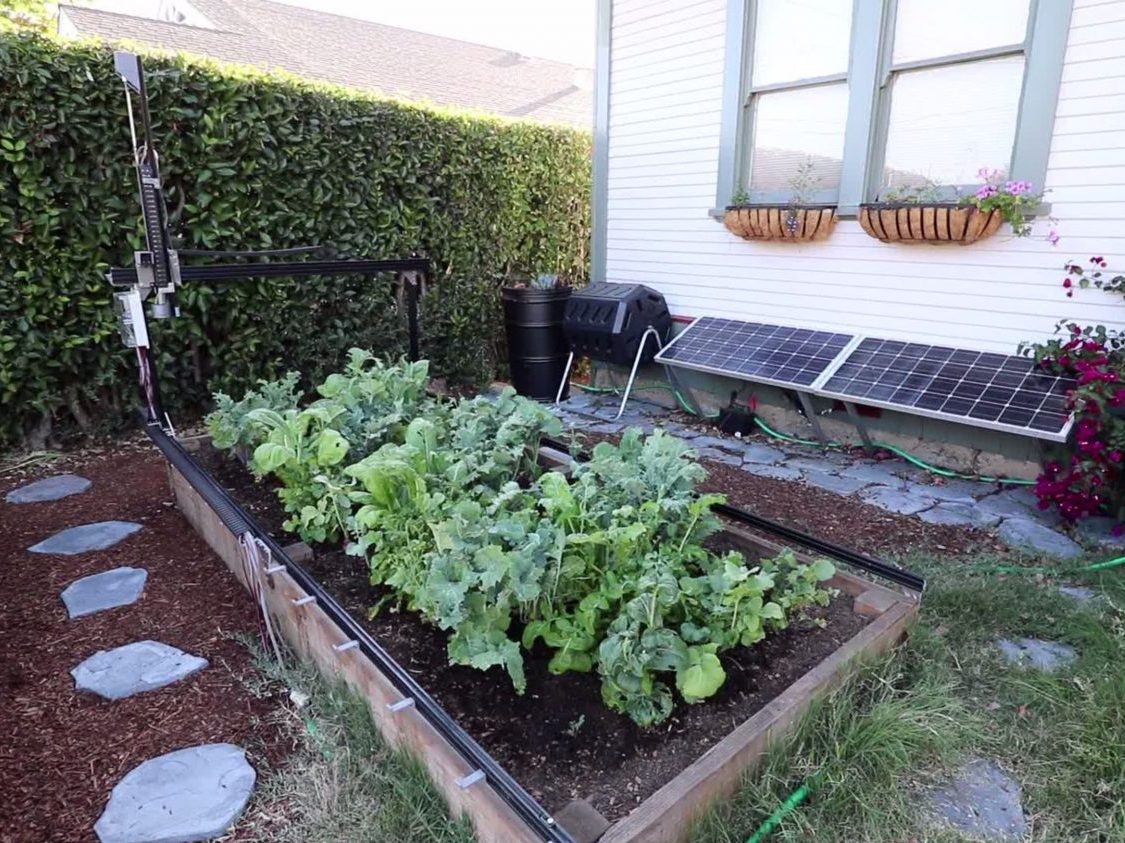
Image context: the cover is a real 2016 photograph of an early FarmBot Genesis in a planted bed. Current hardware has changed, but the scene preserves the stack's essential constraint: abstract commands end in a moving machine sharing space with living plants.[9]
The bed is the coordinate system
FarmBot begins with a strong physical simplification. Tracks define the X axis along the bed, a gantry supplies Y travel, and a vertical tool head supplies Z. Instead of asking a mobile robot to localize itself across a field, the machine works inside a known Cartesian envelope. Current Genesis documentation lists a 1.5-by-3-metre standard model and a 3-by-6-metre XL, covering 4.5 and 18 square metres respectively, with a maximum listed plant height of 0.5 metre.[7]
That geometry is not incidental packaging. The Web App can represent a plant, weed, tool slot, or generic location as a point because the machine and the garden share a coordinate model. A watering operation can therefore be expressed as a location plus a peripheral action; a planting routine can combine a seed tool, a pickup location, a target coordinate, and a depth. The gantry reduces a messy garden to a tractable work surface without pretending that the surface is clean.
The bargain shows up immediately. A fixed frame gives repeatable positioning, but rails can shift, belts can loosen, leaves can enter the travel path, and a crop can outgrow the Z clearance. Rainproof housings do not remove mud, wind, water pressure, tool alignment, or seed variability. Software can schedule an operation exactly while the physical result remains biological and probabilistic.
The Web App stores intent, not motor pulses
At the top of the stack, the Web App is three things packaged together: a browser interface, a REST API, and a real-time message broker.[1] The interface is where a user lays out plants, builds sequences, schedules events, reads logs, and jogs the machine. The API is the durable record beneath it.
The distinction becomes visible in the resource names. The current API documents points, point_groups, sequences, farm_events, regimens, sensor_readings, tools, fbos_config, and firmware_config, among others. These are descriptions of the garden, planned work, observations, and settings. A farm_event can say when to execute a sequence or regimen; a sequence can preserve a reusable command tree. The API can validate and retain those records while the device is offline.[2]
The project documentation is unusually explicit about the boundary: the REST API generally does not control the device. It stores, validates, authorizes, and serves state; real-time control belongs to the broker and the command layer.[2] That separation prevents a slow database request path from becoming the motor-control loop. It also creates a useful integration rule: use HTTP when an add-on needs durable garden data, and use the live channel when it needs to issue or observe an immediate action.
RabbitMQ carries the live edge
FarmBot's message broker is a specially configured RabbitMQ service. HTTP is good at answering a request, but a device should not repeatedly poll a server to discover that a user pressed emergency stop. The broker keeps authenticated connections open so the browser, API workers, FarmBot OS, and third-party clients can exchange commands, status, and resource updates as events occur.[3]
The public transport guidance contains a revealing version skew. The v15 broker page assigns WebSockets to browser clients, MQTT to non-browser integrations, and AMQP to FarmBot OS.[3] But the operating-system changelog records that version 13.1.0 finalized AMQP's removal and made MQTT the only transport; later entries continue to describe MQTT-client behavior.[12] Current integrations should therefore treat MQTT as the device transport and the AMQP sentence as stale documentation, not as a supported architectural seam.
A developer sending commands over MQTT obtains the broker hostname and device identity from an API token rather than hard-coding a server. The documented topic family then separates inbound RPCs, device responses, state, and human-readable logs: from_clients, from_device, status, and logs beneath a device-specific path.[10]
This is more than transport trivia. The broker hostname is deployment detail, while the authorized device identity and topic roles are contract. Treating them differently lets the hosted service move infrastructure without forcing every integration to be rewritten. It also exposes failure modes cleanly: a REST record may be current while the bot is disconnected; a live command may be acknowledged while a later physical action fails; a status stream may stop while historical API data remains readable.
CeleryScript is the shared grammar
Messages still need a meaning that every layer can recognize. FarmBot uses CeleryScript, a JSON-based format that acts at once as a command language, serialization format, and RPC protocol. A node has a kind, required args, and sometimes a body containing more nodes. A sequence built visually in the browser becomes an abstract syntax tree stored through the API; a one-off movement sent through the broker uses the same grammar.[4]
Common nodes reveal the breadth of the contract: move_absolute, read_pin, write_pin, take_photo, execute, wait, emergency_lock, and sync. For real-time work, an rpc_request wraps the requested node, and the device returns rpc_ok or rpc_error. A request label lets clients match responses when many commands share one persistent connection.[11]
The design buys uniformity at the cost of human friendliness. FarmBot's own documentation recommends wrapper libraries such as FarmBotJS or FarmBotPy for most integrations rather than hand-authoring CeleryScript.[4] That is a sensible open-source boundary: the corpus remains inspectable and language-neutral, while ordinary developers work through a safer library. An integration that depends on undocumented node shapes or internal AMQP behavior has crossed from a supported seam into project-internal machinery.
FarmBot OS owns continuity; firmware owns immediacy
The Raspberry Pi runs FarmBot OS, written in Elixir and built with Nerves as an embedded image. It receives schedules and remote calls, reports sensor data and logs, enforces device-side security, and executes operations that must continue with low latency or through a network interruption.[1][5] The cloud retains long-lived intent; the device holds enough synchronized state to keep a planned watering sequence from depending on an open browser tab.
FarmBot OS is not presented as a general-purpose Raspberry Pi distribution. The v15 documentation says SSH access has been removed. Its sidecar guidance is more explicit: the filesystem is read-only, users cannot install arbitrary drivers, Python packages, or kernel modules, and heavier extensions should run on a separate computer connected through documented software or hardware interfaces.[5][13] The controller is an appliance boundary, not an unmanaged server under the garden.
Below it sits the C++ firmware on an Arduino-class microcontroller. Its job is intentionally narrow: drive stepper motors, read encoders and sensors, switch pins and peripherals, and return results. FarmBot OS bundles the firmware as a separately compiled .hex image.[1][5] This boundary keeps database logic and network clients away from timing-sensitive hardware, while keeping complex scheduling out of a microcontroller with only a small memory budget.
It also gives troubleshooting an order. If a scheduled event is absent, inspect API state and synchronization. If an RPC never arrives, inspect broker connectivity and authorization. If FarmBot OS accepts a move but coordinates or peripherals misbehave, inspect firmware settings, calibration, wiring, and mechanics. “The robot failed” becomes a set of narrower questions.
Open source does not erase the hosted service
All of these components can be read, modified, and built, but their operational burdens are not equal. The Web App repository contains the browser client, Rails API, database-facing services, and a Dockerized MQTT server. FarmBot provides a hosted instance for owners and explicitly says ordinary kit users do not need to run the stack themselves.[6]
Its self-hosting warning is refreshingly severe. The project says operating an independent server can consume hundreds of hours, assumes roughly three to five years of Ruby, SQL, and Linux administration experience, may introduce security or data-loss risk, and receives no basic-product support. It also notes that main changes about every two to four weeks, leaving independent operators responsible for updates.[6]
That does not weaken the open-source claim; it defines it accurately. Source availability provides auditability, research access, a path for patches, and an escape hatch from the vendor service. It does not turn Rails, PostgreSQL, RabbitMQ, object storage, secrets, backups, monitoring, and upgrades into a one-click appliance. A school or small lab can modify sequences and hardware without self-hosting. A regulated deployment may value custody enough to accept the server burden. Those are different adoption decisions.
The research payoff appears at the seams
An independent 2025 MethodsX paper shows what the stack makes possible—and what it does not solve. Researchers started with a FarmBot Genesis v1.6, mounted an Intel RealSense D405 stereo camera near the Z axis, and added a Raspberry Pi 5 sidecar because the standard controller was not suited to processing the camera's heavier point-cloud workload. The sidecar and FarmBot controller communicated over UART; open code then coordinated repeated image capture from six viewpoints.[8]
The result was not a new fork of the entire robot. The gantry supplied repeatable coordinates and scheduling, while the sidecar owned stereo capture and reconstruction. The researchers reported roughly 45 seconds to record one plant from the six views. They also documented the real boundaries: changing light added point-cloud noise, wind moved leaves between views, tall crops could interfere with the gantry, and full onboard reconstruction would require more compute.[8]
That is the strongest argument for FarmBot as an ecosystem. A useful extension found the nearest stable seams—physical mounting, UART, scheduled positions, and open software—without asking the motor firmware to become a vision computer. The same example punctures the fantasy of total automation. An extensible platform can make an experiment repeatable; it cannot make sunlight, wind, plant motion, or processing time irrelevant.
Choose the layer before choosing the project
For a home grower or classroom, the sensible stack is usually the official device image plus the hosted Web App. The open code matters as inspectable infrastructure and as a route for community improvement, not as a requirement to operate every service.
For a software integration, begin with the REST API for durable resources and MQTT or WebSockets for live work. Prefer FarmBotJS or FarmBotPy unless the project truly needs raw CeleryScript. Test disconnection explicitly: queue or reject commands deliberately, distinguish broker acknowledgment from completed motion, and decide how stale state will be shown.
For a research instrument, the gantry and sidecar seams are the attraction. Budget for a person who understands the experiment and a person who can own embedded, electrical, and mechanical failures—even if one researcher fills both roles. Calibrate coordinates, define safe travel, test plants at mature height, and preserve the exact hardware, FarmBot OS, firmware, sequence, and add-on versions with the resulting data.
For a self-hosted deployment, the minimum credible system is not “the repository starts.” It is tested backups, restored API resources, broker authentication, release monitoring, secret rotation, object-storage recovery, and an upgrade rehearsal that includes a real device. If the team cannot own those routines, hosted control plus open device-side extension is the more honest architecture.
FarmBot's ecosystem works because it refuses to make one component responsible for everything. The browser describes, the API remembers, RabbitMQ carries, CeleryScript names, FarmBot OS coordinates, firmware actuates, and the gantry meets the garden. The openness is valuable precisely at those handoffs: it lets a developer inspect where an instruction changes form, replace the layer that needs to change, and leave the rest of the machine intelligible.
Sources
- FarmBot Developer Documentation v15, “High Level Overview” — component languages, hardware/firmware boundary, FarmBot OS responsibilities, cloud roles, and task ownership.
- FarmBot Developer Documentation v15, “REST API” — durable resources, storage and validation duties, API specifications, and the boundary between records and device control.
- FarmBot Developer Documentation v15, “Message Broker” — RabbitMQ role, real-time control and synchronization, authentication, and the WebSocket/MQTT/AMQP boundaries.
- FarmBot Developer Documentation v15, “CeleryScript” — JSON node grammar, sequence ASTs, RPC and data-interchange roles, wrapper-library guidance, and command use.
- FarmBot Developer Documentation v15, “FarmBot OS” — Elixir and Nerves build, bundled firmware image, development dependencies, and removal of SSH; its transport sentence is superseded by the OS changelog.
- FarmBot,
Farmbot-Web-Apprepository — Web UI/API/broker package, hosted-service recommendation, self-hosting requirements and risks, update cadence, and MIT license. - FarmBot Genesis v1.8 documentation — current standard and XL work envelopes, intended uses, hardware documentation, and open-source project context.
- Frederik Hennecke, Jonas Bömer, and René H. J. Heim, “Modification of an automated precision farming robot for high temporal resolution measurement of leaf angle dynamics using stereo vision,” MethodsX 14 (2025) — independent FarmBot research deployment, sidecar architecture, timings, and environmental limits.
- Wikimedia Commons, “FarmBot Genesis.jpg” — source and provenance for FarmBot's August 2016 photograph used as the cover, licensed CC BY 4.0.
- FarmBot Developer Documentation v15, “Sending Commands” — API-token-derived broker settings and documented MQTT topics for requests, responses, status, and logs.
- FarmBot Developer Documentation v15, “CeleryScript Nodes” — current node shapes, common commands, and the
rpc_request/rpc_ok/rpc_errorresponse contract. - FarmBot OS,
CHANGELOG.md— version 13.1.0's final AMQP removal, MQTT-only transport note, and later MQTT-client maintenance entries. - FarmBot Developer Documentation v15, “Sidecar Hardware” — read-only device constraints and recommended external-compute interfaces for drivers, packages, and specialized hardware.