Most people meet Jupyter through a notebook tab in a browser. That is the wrong scale for understanding JupyterHub. JupyterHub matters when notebooks stop being a personal convenience and start becoming a service that many people need to enter, authenticate to, and run against shared infrastructure at the same time.[1][2][6]
That is why a plain "browser notebooks for teams" description undersells the project. The useful reading in 2026 is more exact: JupyterHub is the control layer that turns single-user notebook servers into a managed multi-user system, with explicit login flow, routing, spawning, and permissions boundaries.[1][2][3][4] Once you read it that way, the project stops looking like a UI accessory and starts looking like institutional infrastructure.
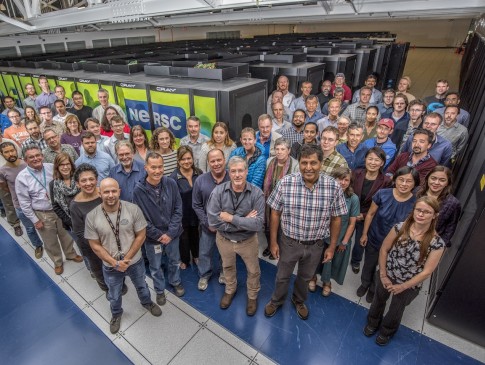
Image context: the cover uses a real NERSC compute-center photograph rather than a product screenshot or a synthetic architecture graphic. That is the right visual here because the article is about JupyterHub as a gateway into shared research and teaching systems, not about notebook aesthetics.[9]
What this project actually is
The official docs and the NERSC background guide are useful together because they separate terms that are often blurred in casual conversation. Jupyter is the broader notebook ecosystem. JupyterLab is one user-facing application inside that ecosystem. JupyterHub is the web application that spawns, manages, and proxies single-user notebook servers for many users.[1][6]
That distinction matters operationally. If a team says it wants "Jupyter," the real question is often whether it wants an interface, a file format, or a shared service. JupyterHub belongs to the third category. Its job is not to replace notebook authoring. Its job is to decide who can log in, where their server starts, how traffic reaches that server, and what policy sits around the whole path.[2][3]
The institutional examples make that concrete. NERSC says it has operated a JupyterHub instance since 2015 and lets users spawn JupyterLab on a login node or inside single-node or multi-node batch jobs depending on workload shape.[6] UC Berkeley's DataHub describes datahub.berkeley.edu as its main JupyterHub, the largest and most active one, serving foundational courses across many disciplines.[7] Those are not edge cases. They are the environments where JupyterHub's value becomes easiest to see.
The architecture is why it matters
The technical overview names the major subsystems directly: Hub, Proxy, and Single-User Notebook Server.[2] That sounds simple until you notice what the split buys you.
- The Proxy is the only process listening on the public interface.[2]
- The Hub handles login and coordinates single-user servers through an Authenticator and a Spawner.[2]
- Each user gets a separate notebook server, and the proxy forwards traffic to
/user/[username]/*after the server comes up.[2]
This decomposition is the project's real argument. JupyterHub does not try to make one giant notebook server impersonate a multi-user platform. It keeps the user workload separate, then wraps that workload in login, routing, and lifecycle control.[2] Inference from the docs: this is why the project has lasted across such different environments. A campus course, a research lab, and an HPC center can all swap authenticators and spawners while keeping the same basic control shape.
That also explains why JupyterHub remains relevant even when many people already know JupyterLab. JupyterLab solves the interactive workspace. JupyterHub solves admission, tenancy, and placement.
Why the 5.x line makes the project easier to trust
The stable changelog shows that the latest documented release is JupyterHub 5.4.0, published on 2025-10-06.[5] The release itself is described as small, but the 5.x line matters for a bigger reason than one point release. It keeps pushing the project toward clearer access behavior and cleaner operational edges.[5]
The most important example is in the authenticator docs. JupyterHub 5.0 added explicit Authenticator.allow_all and allow_existing_users settings, and the docs say the default for allow_all is now False, changing the older implicit behavior where an empty allow-list could act like open admission.[3] That is a serious upgrade in institutional clarity. Shared notebook services should not feel accidentally open because a default was historically convenient.
The same docs also make a second point that matters more at scale: persisted auth_state can contain sensitive information, so enabling it requires explicit configuration and encryption through JUPYTERHUB_CRYPT_KEY, with support for key rotation.[3] This is not glamorous feature work. It is the kind of detail that tells operators the project understands that identity and notebook spawning now sit inside real security boundaries.
RBAC is the feature that turns a demo into an organization
Role Based Access Control is where JupyterHub stops being "multi-user" in a loose sense and becomes administratively usable. The RBAC docs say the system exists to provide fine-grained control over API resources, and they explain the old problem clearly: before RBAC, giving a bot or a group-only admin the power to cull idle servers could require handing over full admin rights, violating least privilege.[4]
The scope-and-role model fixes that. A role can be granted the servers scope without also giving the holder broad power to mutate every user and every object in the Hub.[4] That may sound like a narrow implementation detail, but it is one of the most important reasons JupyterHub fits universities and research groups so well. These environments do not just have "users" and "admins." They have instructors, teaching assistants, support staff, automation services, and central platform teams. A notebook service that cannot express those distinctions eventually turns into informal privilege sharing.
Put differently: RBAC is not frosting on the project. It is part of the reason JupyterHub can act like a real shared service instead of a clever lab setup.
The real operational boundary is resource policy
Berkeley's public support docs show the next truth that many first-time evaluators miss: once notebooks become shared infrastructure, resource policy becomes product behavior.[8] DataHub documents a default per-user memory limit of 1 GB and says instructors requesting more memory or CPU need to justify it because the change has service-cost implications.[8]
That is exactly the right lesson. JupyterHub adoption is not only about whether login works or whether Kubernetes can launch a container. It is about whether your organization is ready to answer harder questions:
- Which identities are allowed in?
- Where does each user's server run?
- What storage is persistent?
- What memory and CPU envelope is normal?
- Which roles can start, stop, cull, or observe servers?
NERSC's deployment shows the same point at a different scale. Its JupyterHub can launch on login nodes or in batch jobs, and batch-backed notebook servers consume project allocation because the notebook is attached to real compute scheduling, not a toy sandbox.[6] That is the best way to understand JupyterHub's sweet spot. The project shines when interactive computing has to live inside the same governance frame as the rest of the institution.
Best-fit boundary and mismatch boundary
JupyterHub is a strong fit when a team wants notebook access to feel like an official entry point into shared compute: one login path, one proxy layer, one placement policy, and separate user servers behind it.[1][2][6][7][8] Universities, training programs, internal data platforms, research groups, and HPC centers are the natural users because they repeatedly need exactly that combination.
It is a weaker fit when a team is looking for a total platform in one package. JupyterHub does not erase the need to choose authenticators, spawners, storage, images, quotas, or resource classes.[2][3][4] It also does not replace workload-specific orchestration, cost policy, or content-management discipline around notebooks. The project gives you a durable control point. It does not remove the operational decisions around that control point.
That boundary is a virtue, not a flaw. JupyterHub stays valuable because it is narrow in the right place. It does one hard thing well: it turns interactive notebook computing into a governable multi-user service.
A practical first month
The highest-signal evaluation path is not complicated:
- Pick one real identity source and make admission rules explicit from day one, especially on JupyterHub 5.x where
allow_allbehavior should be a deliberate choice.[3] - Start with one spawner target that matches your dominant workload, rather than trying to support every execution environment at once.[2][6]
- Define memory, CPU, and idle-server policy before broad rollout so the first successful class or team does not accidentally become the entire service model.[4][8]
- Use RBAC early for instructors, support staff, and automation services instead of drifting into shared admin credentials.[4]
- Treat the notebook image and storage layout as first-class product decisions, because that is what users will actually experience as "the platform."
That sequence keeps the project tied to the reason it matters.
Bottom line
JupyterHub in 2026 deserves to be introduced as infrastructure, not as a nicer way to open notebooks in the browser. Its durable value comes from the control plane around the notebook server: authentication, proxying, spawning, and role-scoped access that let many users share one service without collapsing into one shared process.[1][2][3][4]
If your organization needs interactive computing to behave like an official service, JupyterHub is still one of the clearest OSS answers. If you only need a notebook on one machine, the project will feel heavier than necessary for exactly the same reason.
Sources
- JupyterHub documentation home — project overview and scope.
- JupyterHub technical overview — Hub, Proxy, single-user notebook servers, login flow, and routing model.
- JupyterHub authenticator documentation — explicit
allow_allbehavior and encryptedauth_statehandling. - JupyterHub RBAC documentation — scopes, roles, idle-culler use cases, and least-privilege administration.
- JupyterHub changelog — stable 5.4.0 release on 2025-10-06 and the recent 5.x release line.
- NERSC Documentation, "Jupyter at NERSC: Background Information" — long-running JupyterHub service, login identities, spawn targets, and usage context.
- UC Berkeley DataHub documentation — DataHub as Berkeley's main JupyterHub serving foundational courses across disciplines.
- UC Berkeley DataHub curriculum guide — public memory and CPU policy examples for a shared JupyterHub service.
- NERSC official photo asset — staff beside the Cori supercomputer, used here as the article image.