A model locomotive can look exactly right and still pull away too sharply, stop too abruptly, or illuminate the wrong lamp. DecoderPro, the free, open-source decoder-programming application within JMRI, gives those behaviours a readable set of controls. It also keeps a roster of individual locomotives and their settings. That second job becomes valuable when a favourite engine returns to the workbench months after its last adjustment.[1][7]
The small computer inside a Digital Command Control locomotive is called a decoder. During operation, it receives commands through the rails, responds to its address, and controls the motor and whatever additional functions it supports. Its configuration variables, usually shortened to CVs, hold settings that owners can change. Some contain a numerical value; others pack several switches into the bits of one byte. A decoder can therefore offer many adjustments through a rather unfriendly collection of numbers.[2]
DecoderPro presents these choices with labels, groups and tooltips. The attraction is easy to recognise: the modeller wants to adjust a behaviour, then remember the successful setting when the engine comes back.[1]
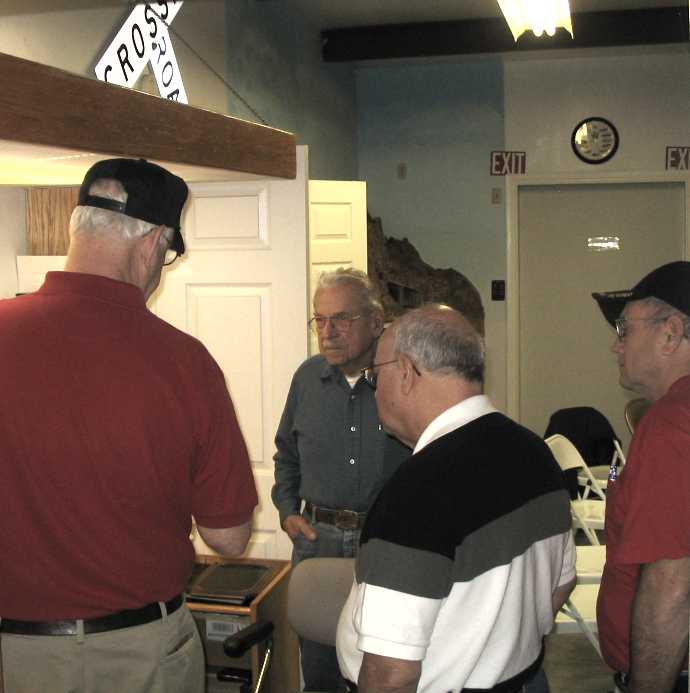
The club photograph captures a useful setting for learning this software: several people gathered around one person's demonstration. All Points North's accompanying account identifies the lesson as programming DCC locomotives through the club computer.[3] The knowledge being shared includes how to connect a particular physical railway to the controls on the screen.
An independent user review supplies another perspective. Writing on Quinntopia in May 2010, Jerry described using DecoderPro with a SPROG II programmer while retaining his existing handheld controllers for running trains. He welcomed the clearer access to settings, while recording frustrating connection problems on one computer.[4] The equipment and installation advice belong to that period. The reason for his enthusiasm remains intelligible: a better programming workspace could improve an existing railway without replacing the way he liked to operate it.
Start with the decoder inside
DecoderPro's short tour, illustrated with version 5.1.3, begins with New Loco and a choice of decoder. Read type from decoder can narrow the possibilities, but may leave several candidates. The modeller still needs to confirm the actual model. Selecting an attractive-looking entry from a list is insufficient evidence of what is beneath the locomotive's body.[5]
That identification matters because the interface is assembled from descriptions of the hardware. JMRI distinguishes three kinds of configuration file: a decoder definition describes a decoder type; a locomotive file records a particular engine; a programmer definition arranges the editing screens. The decoder description can turn separate options within one CV into separate named controls.[6]
This separation lets two engines share a description of what their decoders can do while retaining different settings. It also gives a missing control a useful context: check the selected decoder and its supported features before assuming the application has lost an option. The software's readable vocabulary depends on an accurate description of the device.[1][6]
A setting has three places to live
Imagine adjusting acceleration, saving the roster entry, and finding that the locomotive still starts just as briskly. The important question is which operation reached which destination.
DecoderPro distinguishes the value being edited on the computer from the value written to the decoder. Its documentation says communication with the programmer happens when the user presses a read or write button. Editing a field prepares a change; writing sends it toward the hardware.[6] Saving the roster, meanwhile, stores the record on the computer. JMRI explicitly allows creating and editing roster entries without a layout connection.[7]
The tour makes uncertainty visible through field states. A value loaded from a locomotive file is marked differently from one read from the decoder: the file may agree with the engine, but that agreement has not been established in the present operation.[5] A saved record is useful evidence of previous work. An adjustment made through another controller can leave that evidence out of date.
For a first session, I would keep the experiment small: read the relevant settings where the hardware supports it, make one modest adjustment, write it, and observe the locomotive. Save the resulting roster entry once the behaviour is understood. This sequence makes it easier to connect an observed change with a deliberate action, and to recognise whether the next problem concerns the record, the communication, or the engine itself.
The roster can also travel. Its export command creates an XML file containing an entry's comments and CV values, which another DecoderPro installation can import.[7] A locomotive arriving at a club can bring its workshop record along. That record is most useful when its owner can explain when the settings were last checked.
The rails remain part of the computer
A friendly interface still depends on programming hardware. JMRI's service-mode manual notes that command stations differ in programming-track and readback support. Where supported, a decoder can acknowledge a request with a brief increase in current, often by pulsing its motor; a small twitch during reading can be part of that exchange.[8]
The track is therefore a communication path. A failed response calls for checking connections and equipment capabilities before repeatedly editing a setting. Service-mode writes reach every decoder on that programming track, so put only the intended locomotive there and follow the command station's instructions for isolating it from the layout.[8]
For an individual modeller or small club, I would begin with one known locomotive and one person maintaining its record. Confirm readback support before planning a large roster-reading session. The software can organise work without extending the connected hardware's capabilities.[7][8]
Hardware knowledge that people can maintain
The project's openness reaches beyond its application code. JMRI documents how to build a decoder definition by adapting an existing XML file, describing the decoder family and its variables, placing the file in the user's decoders directory, and rebuilding the decoder index. It asks contributors to begin with the latest definition and avoid unnecessary reformatting so changes remain easy to compare.[9]
That is a specific kind of maintenance opportunity. Someone who understands a decoder's manual can help improve the description through which other modellers encounter it. The contribution might concern a label, a supported option or the mapping between a control and a CV. It still needs careful checking against the hardware; a readable description can be wrong.
The saved locomotive file preserves both named variable values and numeric CV values. JMRI explains that retaining both helps it handle later changes to decoder definitions.[10] The record therefore carries more than the appearance of one programming screen.
DecoderPro's appeal lies in this continuity between a physical model, its settings and the people who look after it. After the lamps behave properly and the engine eases away at the desired pace, the successful setup has somewhere to live. The next session can begin with a record worth checking, and a clearer account of what was changed.
Sources
- JMRI, “DecoderPro User Guide” — project purpose, symbolic programming and open-source implementation; official documentation source, consulted November 16, 2026.
- JMRI, “What is DCC?” — addressed commands, decoder functions and configuration variables; official documentation source.
- All Points North Model Railroad Association, “Photo Potpourri,” entry “Dispatcher's Desk” — photograph and account of the January 2006 DecoderPro demonstration.
- Jerry, “Sprog II and DecoderPro,” Quinntopia, May 28, 2010 — independent user review of the programming workflow, benefits and connection difficulties.
- JMRI, “A Short Tour” — tour illustrated with DecoderPro 5.1.3; decoder identification and field states; official documentation source.
- JMRI, “DecoderPro Details” — decoder, locomotive and programmer definitions; named variables and explicit read/write operations; official documentation source.
- JMRI, “Rosters” — stored settings, offline editing and roster import/export; official documentation source.
- JMRI, “Service Mode Programmer” — command-station capabilities, acknowledgement and programming-track writes; official documentation source.
- JMRI, “Creating a Custom Decoder File” — XML definitions, user file location, decoder index and contribution guidance; official documentation source.
- JMRI, “Locomotive Files” — per-locomotive XML records containing variable values and CV values; official documentation source.