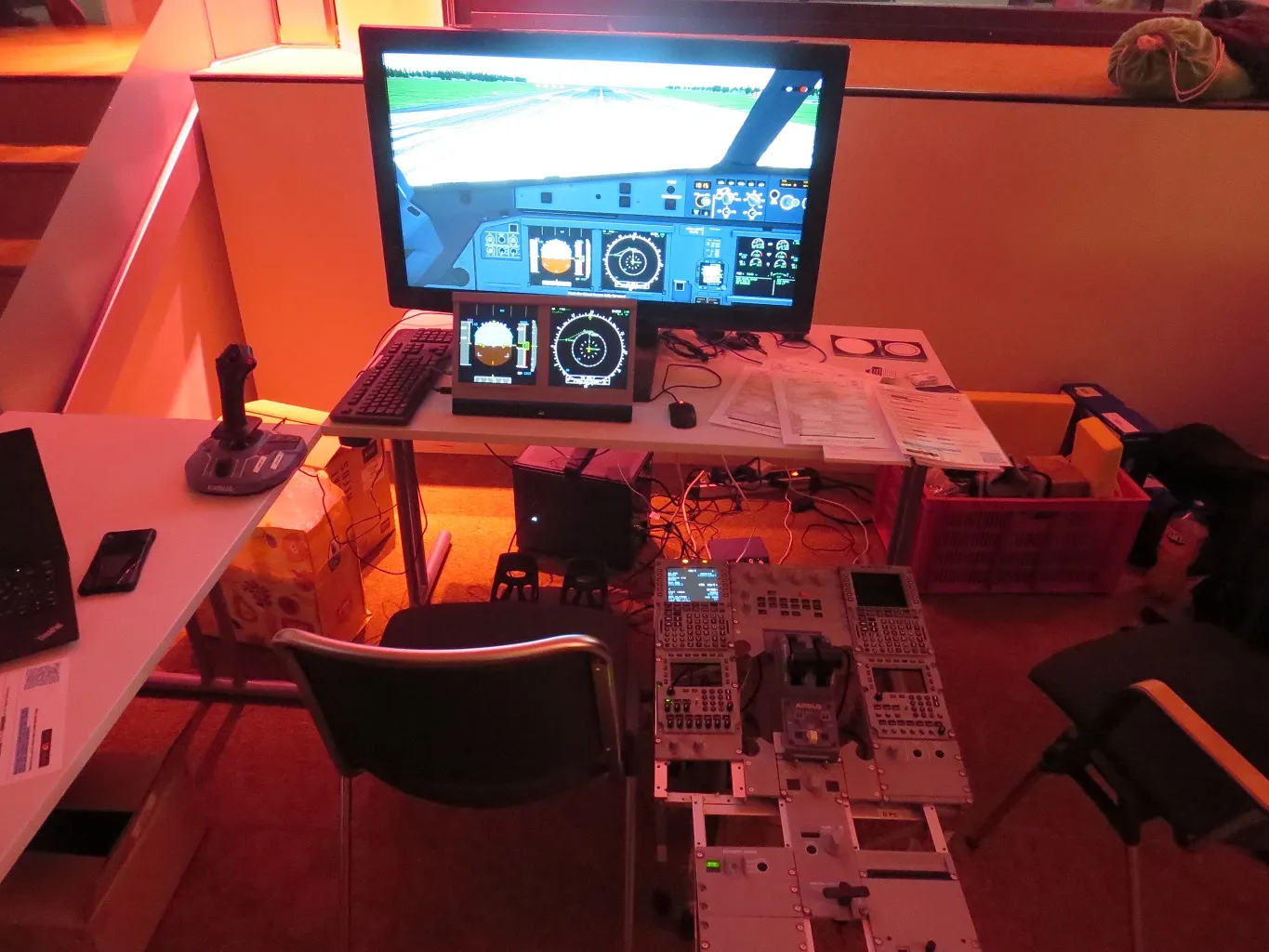
Press a homemade sidestick in Nia's Airbus cockpit and the physical gesture has to cross several borders before it can bank a virtual aircraft. A device reports an input. A binding gives that input a meaning. A flight-dynamics model turns control deflection into forces and motion. Instruments, displays, sounds, scenery, and perhaps another computer all need the resulting state. FlightGear's most revealing design choice is not how it draws the horizon. It is where those parts meet: a hierarchy of named, live values called the property tree.
That makes FlightGear worth introducing as more than a no-cost alternative to a commercial flight simulator. The project's stated scope includes research, education, pilot training, engineering, DIY experiments, and desktop flying.[2] Its supported 2024.1 line was still moving in August 2026, when version 2024.1.7 shipped for Linux, macOS, and Windows.[1] At FlightSimWeekend on March 28–29, 2026, Nia brought homemade Airbus hardware, Torsten demonstrated a browser-based panel, and a vendor tested a helicopter cyclic and collective with FlightGear.[8] The same open seam serves a person building one radio panel and a laboratory replacing the flight model entirely.
The property tree is why those uses can inhabit one project. It is also the place where an attractive prototype can acquire ambiguous ownership, mismatched units, unsafe network exposure, and timing bugs. The useful way into FlightGear is therefore to follow one value through the system, then ask what its path name does—and does not—guarantee.
The airplane is assembled around shared state
FlightGear is a simulator application, but it behaves like an integration framework. The core executable coordinates rendering, input, weather, navigation, traffic, audio, aircraft systems, and a flight-dynamics model. Aircraft and base data live outside much of that compiled core; external programs and physical panels can participate through several I/O mechanisms. The property tree provides the common vocabulary.
Its paths look like filesystem names:
/controls/flight/aileron
/position/altitude-ft
/orientation/roll-deg
/instrumentation/airspeed-indicator/indicated-speed-kt
The tree holds typed runtime values in a hierarchy. C++ subsystems, XML configuration, Nasal scripts, input bindings, flight models, cockpit instruments, command-line options, and network clients can read or write nodes. Listeners can react when a value changes. FlightGear's current C++ reference describes the property tree as a fundamental structure, identifies the global tree visible to the simulator, and documents node types, access attributes, paths, aliases, and listeners.[3]
This is a deliberately modest abstraction. A path lets two components find the same value without one linking directly against the other's implementation. It does not make that value an event history, a strongly versioned message, or an automatically enforced ownership contract. /orientation/roll-deg tells a consumer what quantity it should find and suggests the unit. It does not tell the consumer how fresh the sample is, which subsystem last wrote it, or whether changing it is physically legitimate.
That distinction explains both the project's reach and its sharp edges. The tree lowers the cost of joining parts. The integrator still has to define the behavior of the join.
Follow one movement of the stick
Consider a pilot moving a joystick to the right. FlightGear's input subsystem turns device events into configurable bindings. A binding may scale an axis and write a normalized value to /controls/flight/aileron. The selected aircraft's control system or flight-dynamics model reads that command; some aircraft interpose their own mechanical or digital flight-control logic rather than treating it as a direct surface position.[7][10]
The flight model advances the aircraft state. It publishes quantities such as roll, pitch, heading, position, velocities, and accelerations back into the tree. Aircraft animations can read surface-position nodes to rotate visible ailerons. A panel can read roll and airspeed. An autopilot can compare a target with current orientation and write a control command. A logger or external experiment can sample the same state.
The important architecture is not a rigid pipeline of boxes. It is a set of participants meeting at named nodes:
hardware event -> input binding -> control property
control property -> aircraft/FDM -> state properties
state properties -> instruments, animation, audio, logs, external clients
Even this simplified trace contains a crucial caveat: the aircraft package decides some of the intermediate paths and logic. FlightGear publishes common control and orientation names, while its model reference shows aircraft animations reading relative, model-scoped paths such as surface-positions/elevator-pos-norm.[10] An integration that works by guessing names from one Cessna is not yet an integration contract for an Airbus, helicopter, or spacecraft.
The correct first debugging tool is therefore not a packet sniffer or a search through every source repository. It is the running tree. FlightGear can expose a local property browser, and its --httpd=5400 option starts a web interface from which the live hierarchy can be inspected and many values changed.[5] If the aileron command moves but the modeled surface does not, the tree helps locate the boundary where the expected state stopped propagating.
The flight model is a replaceable participant
Many simulators fuse the visual world and the equations of motion in the user's mental model. FlightGear makes their separation unusually concrete. The 2024.1 manual lists JSBSim, YASim, several special-purpose models, a network-fed model, a Unix named-pipe model, and an external/null mode among the --fdm choices. It also exposes --model-hz=n to set the flight-dynamics iteration rate.[4]
JSBSim illustrates the seam. It is itself an open-source, C++ flight-dynamics library that can run without graphics in batch mode or be embedded in FlightGear and other simulation environments. It models nonlinear six-degree-of-freedom motion, configurable aerodynamics, propulsion and landing gear, and an Earth model based on WGS84.[6] FlightGear supplies the wider world—visuals, input, weather, instruments, traffic—while properties carry relevant state across the boundary.
An external flight model can use that separation too. The manual's network mode exchanges flight-dynamics data over UDP. On Unix systems, pipe mode keeps both processes on one machine and avoids the packet loss, reordering, and lateness that the manual explicitly associates with the network path.[4] Neither option turns distributed simulation into a free feature. A serious harness should specify at least:
- the authoritative writer for every exchanged property;
- units, valid ranges, and the treatment of missing or non-finite values;
- model rate, sample rate, and whether a value is instantaneous or held;
- startup and reset ordering;
- behavior when a packet is late, duplicated, reordered, or absent;
- the evidence that simulation time, wall time, and rendering time have not been confused.
That contract matters more than transport choice. A fast UDP stream with two writers for altitude is less reliable than a slower channel with explicit ownership and failure behavior.
Openness reaches above the C++ core
The property tree also changes who can build an aircraft. A developer can use XML to load configuration and connect model animations to properties; Nasal scripts can add behavior and create or manipulate nodes without a C++ rebuild. Command-line arguments can seed values. Generic protocols can select a set of properties and serialize them to a file, serial line, or socket.[3][5]
This is why a physical control desk belongs on the cover. The 39C3 setup was not merely a themed keyboard placed in front of a game. Its MCDU, EFIS, radio panel, sidestick, and pedestal made the software's extension boundary tangible.[8] A home builder can start with one encoder, map it to a known path, and expand panel by panel. A researcher can stream a small state vector rather than fork the renderer. An aircraft author can iterate on an instrument or control law in data and scripts.
The result is a different kind of openness from source availability alone. The GPL lets a developer inspect and change the program. The live namespace offers a place to attach something without first changing the program. For experimentation, that second property can be the more immediately useful one.
A namespace is not a safety system
Easy attachment creates four recurring failure modes.
First, a writable name does not identify its owner. FlightGear's generic I/O accepts input as well as output, and a protocol definition maps incoming chunks to property nodes.[5] A joystick, autopilot, Nasal system, and external controller can therefore fight over a control node unless the integration assigns authority. The symptom may look like noise or sluggishness when the actual bug is alternating writers.
Second, discoverability is not schema discipline. FlightGear documents a global tree, a catalog of common properties, and model-relative paths; the node API also permits code to find or create children dynamically.[3][10] Names and types therefore need to be captured against a specific aircraft and release. An integration team should keep a small manifest recording path, type, unit, direction, expected update rate, owner, and fallback for each node it uses. Probe that manifest at startup and fail visibly when an expected node is absent; silently creating or accepting a nearly identical path converts a spelling error into believable bad state.
Third, the network interfaces are control surfaces. FlightGear's I/O guide shows socket inputs and an HTTP server that can display internal variables and change writable ones.[5] Those capabilities belong on loopback or a deliberately isolated, authenticated gateway—not casually exposed because the interface happens to speak familiar protocols. The threat model is not limited to stolen data. A client may change controls, weather, simulation state, or test results.
Fourth, hardware support has concrete edges. The current input documentation says FlightGear's HID path does not hot-plug devices without restarting the input subsystem. It can drive some output reports, but force feedback is not implemented, and the simulator does not currently model the control-surface loading needed to drive it.[7] A cockpit procurement list should distinguish “USB HID input works” from “every lamp, motor, and force cue closes the loop.” Open interfaces make missing layers buildable; they do not make them present.
These are not arguments against the property tree. They are the operational meaning of its flexibility. The abstraction deliberately permits combinations that a narrower product would forbid, so validation has to move into the integration.
A useful first afternoon
Start with the supported build, one well-maintained aircraft, and one local interface. Launch FlightGear with --httpd=5400, open the property browser on the same machine, and move a single control. Watch /controls/flight/aileron, then the aircraft-specific surface node and /orientation/roll-deg. Write down which component owns each transition and which update is merely an observation.
Next, export only a handful of values through a generic protocol at a deliberately low rate: simulation time, latitude, longitude, altitude, roll, and one control. Stop the receiver and restart it. Pause and reset the simulator. Change aircraft. The experiment is successful when the consumer detects those state transitions correctly, not merely when numbers arrive during one smooth flight.
Only then add another writer or physical device. Give it an explicit enable condition and a visible indication of authority. Record the supported aircraft, FlightGear release, model rate, and input-device identity. If the work is for training or research, preserve the configuration and raw outputs with the result. FlightGear can be part of a rigorous apparatus, but the open-source application alone does not validate the complete device, the scenario, or the conclusions.
An independent Linux Magazine review, conducted with the much older 2018.3 release, described FlightGear as mature, complex simulation software with rendering options that could be scaled to available hardware.[9] The version boundary matters, but so does the larger observation: this is a deep system, not a single uniform experience. Aircraft completeness, hardware behavior, scenery, settings, and development builds can vary. Evaluate the exact configuration you intend to operate.
FlightGear's screenshots show what the simulator can render. Nia's desk shows something more distinctive: the project can let code, data, and handmade hardware agree that one named value means the same thing. That agreement is the architecture. Treat its names as contracts, its writable ports as control surfaces, and its clocks as part of the data, and the cockpit becomes more than an interface. It becomes a testable assembly of replaceable parts.
Sources
- FlightGear Project, “Download” — supported version 2024.1.7, release date, platforms, package sizes, and source-code links.
- FlightGear Project, “About” — project scope across research, education, training, engineering, DIY work, and desktop simulation.
- FlightGear Project, “The Property Tree” — global and local tree structure, and
SGPropertyNodeC++ reference — types, access attributes, paths, aliases, and listeners - FlightGear Project, FlightGear Manual 2024.1, “Takeoff: How to start the program” — flight-model choices,
--model-hz, and external network/pipe behavior. - FlightGear Project,
README.IO— generic I/O invocation, transport/rate configuration, and writable HTTP access, andREADME.protocol— property-to-field mappings - JSBSim Project,
README.md— standalone and embedded operation, six-degree-of-freedom model, configurable aircraft systems, and Earth model. - FlightGear Project, “Input Subsystem” C++ reference — event-input structure, HID enumeration, hot-plug boundary, output reports, and force-feedback limitation.
- Gijs, “FSWeekend 2026,” FlightGear Project (April 8, 2026) — current community activity, DIY hardware context, photograph, attribution, and licence.
- Peter Kreußel, “Above the Clouds,” Linux Magazine 234 (2020) — independent review of FlightGear 2018.3, its maturity, complexity, and adjustable graphics load.
- FlightGear Project,
README.properties— common control and FDM paths, and “Property Root” model reference — the distinction between global and model-relative properties