In Plover’s first writing exercise, the comma takes four fingers. On a QWERTY keyboard, press J, K, L and the semicolon key together, then let go. A comma appears in the text editor. Change the shape of the hand and a whole word can arrive just as quickly. Plover is the open-source software that makes this possible. Its appeal starts with a modest proposition for anyone curious about stenography: you can try writing this way in an editor you already know. [1][2]
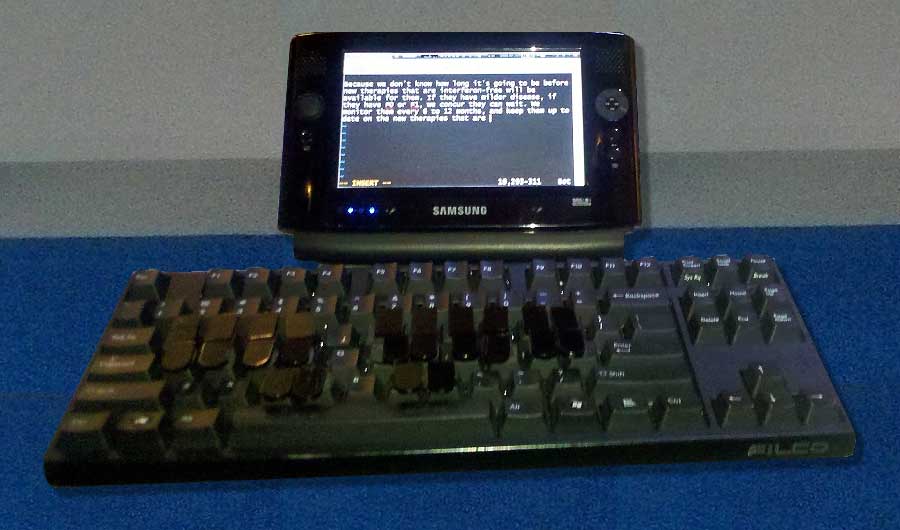
In an early project photograph, a desktop keyboard sits in front of a Samsung tablet. Several keys carry broad, flat toppers, and a few lines of text are already on the little screen. [6]
The project grew out of captioner Mirabai Knight’s effort to make stenography affordable to learners. She hired a developer to build Plover. One of the people who subsequently learned shorthand through the community, Ted Morin, went on to use it to write software. The connection between those two desks is quite literal. Plover looks up a stroke and sends keystrokes to the active application. A captioner and a programmer can keep different dictionaries and use different editors while sharing the same translator. [2][3]
What the fingers learn
Consider the next word after the comma in the exercise, “world.” On a standard US keyboard the five keys are D, V, J, O and the left square bracket. Their printed legends give little help. Plover assigns those positions to the steno keys W, O, R, L and D. The writer depresses the group in one motion. In the default keyboard mode, releasing the last key completes the stroke. The editor receives the word with its spacing already handled. Learning where to put the fingers is one job. Learning which combinations will yield the intended English is another. [1][2]
A writer can use the second skill on a different machine. Hackaday’s account of early Plover hardware describes moving from an ordinary keyboard with sufficient rollover to a dedicated writer while keeping the dictionary. Rollover is the keyboard’s ability to register several keys held down together. A board can type each letter of a word perfectly well in succession and still drop a key when the writer presses a handful at once. That makes for a peculiar first lesson: the wrong word can come from a hand that was in exactly the right place. [1][4]
Where one word ends
Suppose you keep a diary of a cat’s meals and want to give the file a two-word name. Plover’s glossary documents the trap. With the default dictionary, writing the strokes for “cat” and “log” in succession produces “catalog.” The same pair of strokes is an outline for the longer word. To get “cat log,” the writer can explicitly insert a space between the strokes. An otherwise welcome saving of effort costs an extra gesture in the one file where the distinction matters. [5]
That example explains why a shorthand dictionary is worth carrying from one keyboard to the next. Its entries record decisions about which readings deserve the shortest motions. A programmer might reserve a favorite chord for a recurring variable name. Someone who captions meetings could use the same chord for a phrase that comes up every week. Both would have to consider what the chord already writes before claiming it. Once the motion is habitual, replacing a dictionary means relearning some of those decisions with the hands. [2][4][5]
For a first session, Plover offers a particularly good place to watch a mistake happen. Open Tools → Paper Tape beside the editor and try the comma. The tape should show -RBGS, Plover’s notation for those four right-hand steno keys. A missing key on the tape sends you back to finger placement or keyboard rollover. A complete stroke beside unexpected text gives you a reason to inspect the active dictionary. The tape preserves what the hands sent, even when the editor shows only the polished punctuation. [1]
Sources
- Plover Wiki, “Beginner’s Guide,” including the keyboard exercise and paper-tape check.
- Open Steno Project, Plover overview and keystroke output.
- Open Steno Project, project history and Ted Morin’s account of writing code with steno.
- Hackaday, “Stenography (Yes, With Arduinos),” on keyboard rollover, personal dictionaries and changing hardware.
- Plover Wiki, “Glossary,” entry on word boundaries.
- Open Steno Project, early project site and photograph of the Plover tablet demonstration.