Imagine the current song filling a room while, inside the DJ's headphones, another song is already under examination. Its opening might be too busy; the bass might arrive sooner than expected. There is still time to choose something else. Mixxx, a free, community-developed DJ application, makes this private audition part of playing a digital music collection live. It can play and manipulate several tracks at once, with a separate headphone feed for preparing what comes next.[1]
That is a useful way into a program whose screen can initially look crowded. The decks, waveforms and knobs serve a recognizable job: keep the present song moving while making decisions about its successor. In his review of Mixxx 2.5.1, Phil Morse praised its concentration on the fundamentals of DJing, while finding that configuration and controller mappings demanded attention.[2] The distinction matters: getting the application running is the beginning of assembling an instrument.
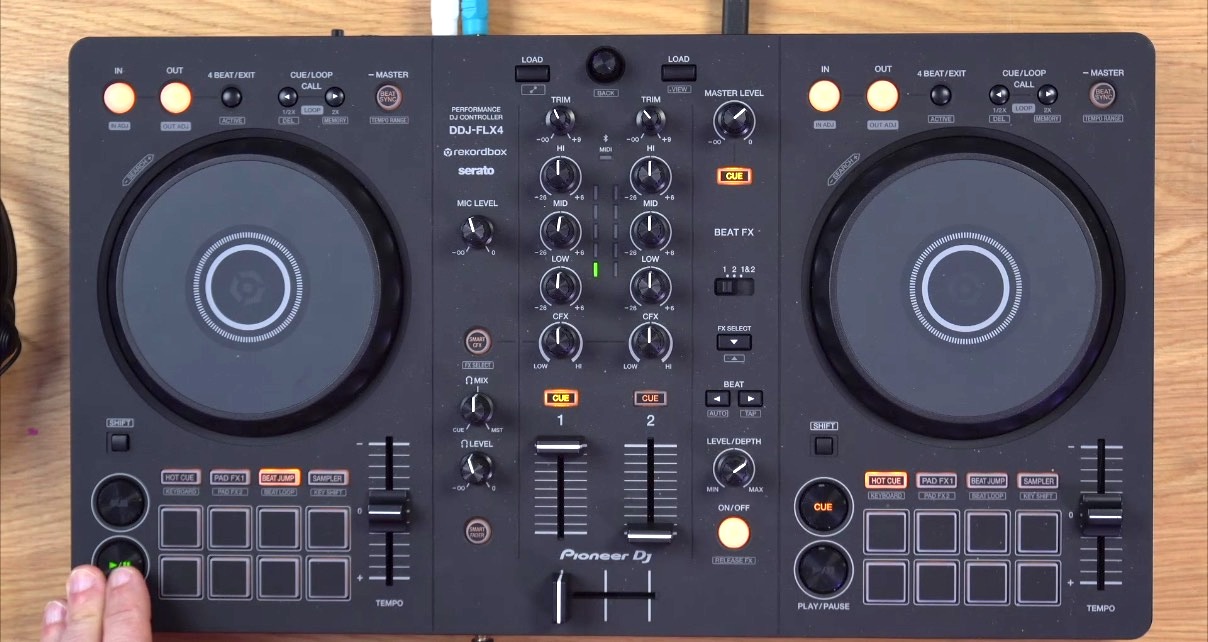
A private audition
PFL, for pre-fader listen, selects a deck for headphone monitoring independently of its volume fader and the crossfader. With the incoming deck's fader fully down, the DJ can hear it privately while keeping it out of the main mix.[3]
Pressing PFL does not itself silence a track in the room. If the deck's fader is up and the crossfader allows it through, the headphone button simply adds another place where it can be heard.[3]
The headphone mix knob balances the PFL signal against the main mix inside the headphones. Selecting a deck, sending it to the audience and comparing the two feeds are separate decisions.[3]
Give the second song somewhere to go
Software separation needs physical outputs. The hardware manual recommends an audio interface with four independent output channels: two stereo pairs. A laptop's headphone socket commonly redirects its existing stereo output rather than supplying another independent one. Counting sockets is also unreliable; several connectors can carry the same signal.[4]
For a compatible multichannel interface, the manual's example assigns Main to Channels 1–2 and Headphones to Channels 3–4 under Preferences → Sound Hardware → Output. The device's own documentation still determines which channels reach which connectors.[5] The meaningful test is audible: one track at the speakers, another in the headphones, with the second deck's fader down.
There is a modest alternative. A purpose-built DJ splitter cable divides a stereo output into separate mono feeds for audience and headphones. An ordinary headphone-sharing splitter duplicates the same stereo signal and cannot provide that separation. The DJ cable gives up stereo to obtain two independently usable feeds.[5]
A computer alone is enough to start learning. Mixxx also documents a practice setup that sends only the headphone feed to the available output and lets the user switch between cue and main listening. That arrangement provides no simultaneous main output for a room of listeners.[5] Practice and a live setup can share the application while needing different wiring.
What the sync button can hear
Once the second track is private, there is room to work on the transition. Beatmatching involves both matching tempo and aligning the beats. Tapping SYNC can do that work, provided the detected tempo and beat grid are correct.[6] Two tracks with the same displayed BPM can still have their kicks landing at different moments.
The grid is the software's account of where the beats fall. Mixxx's beat-detection documentation distinguishes an offset grid from an inaccurate tempo estimate: the first can remain consistently displaced, while the second can gradually drift away from the music. It provides controls for correcting those problems and an Assume constant tempo setting that can be disabled for variable-tempo material.[7]
Listen to an actual passage before accepting the alignment. A transition can be rhythmically tidy and still put two competing vocals on top of one another. Choosing an entrance remains a musical decision; the manual explicitly treats the placement of intro and outro transitions that way.[6] Headphone cueing is valuable because it gives that decision somewhere to happen before the room hears the result.
The controller has two jobs
A physical controller makes it possible to move two controls with two hands. Its knobs and buttons usually send MIDI or HID messages to the computer; a mapping tells Mixxx what those messages mean. Many controllers also contain an audio interface, but controlling playback and carrying audio are separate functions.[4]
That separation explains why a promising controller can still need work. The audio outputs might function while a jog wheel behaves unexpectedly, or a mapping might respond while the headphone routing remains wrong. Morse's 2.5.1 review offers a concrete historical example: his DDJ-FLX2 community mapping covered basic functions, but he found the jog-wheel response unsatisfactory.[2] This is evidence about that tested combination, not a verdict on every subsequent mapping.
For an individual learning at home, investigating a mapping can be part of the appeal. For a small event crew sharing equipment, I would keep one tested configuration, name a person responsible for changes, and rehearse the handover between operators. A successful private audition should be repeatable by the next person at the desk.
An open project with somewhere to grow
There is a timely reason to revisit Mixxx beyond its price. On November 2, 2026, maintainer Daniel Schürmann called for an embedded roadmap to bring existing standalone-hardware efforts together. His post describes work to review and integrate community projects; it is an invitation to build that support, not a promise that every standalone device already runs an official Mixxx build.[8]
The first useful experiment can stay much smaller. Take two familiar tracks, establish the separate listening feeds, and record a transition. Mixxx records its main output by default, so the playback lets you examine what you sent to the audience.[6] Listen for the moment the incoming song becomes audible. If the entrance feels deliberate, the application has helped turn a folder of recordings into a performance.
Sources
- Mixxx User Manual 2.5, “Introduction to Mixxx” — community development, simultaneous playback and separate monitoring; checked November 4, 2026.
- Phil Morse, “Mixxx 2.5.1 DJ Software Review,” Digital DJ Tips, June 16, 2025, updated January 22, 2026 — independent assessment, DDJ-FLX2 mapping experience and the controller photograph.
- Mixxx User Manual 2.5, “The Mixxx User Interface” — PFL, channel faders, crossfader and headphone mix controls.
- Mixxx User Manual 2.5, “DJ Hardware” — independent output channels, controller messages, mappings and integrated audio interfaces.
- Mixxx User Manual 2.5, “Example Setups” — multichannel output assignments, DJ splitter cables and computer-only practice.
- Mixxx User Manual 2.5, “DJing With Mixxx” — beatmatching, transition choices and recording the main output.
- Mixxx User Manual 2.5, “Beat Detection” — constant-tempo assumptions, displaced grids and tempo-estimate drift.
- Daniel Schürmann, “Unlocking Standalone DJing: Mixxx on Bare Metal,” November 2, 2026 — proposed embedded roadmap and integration of community hardware efforts.