A coffee roast produces more than a batch of beans. It also produces a sequence of decisions: when the coffee went in, when the operator changed the heat, when first crack was marked, and when the beans came out. Artisan gives that sequence a record that can be reopened beside the next batch. This free, open-source desktop application connects roast measurements with the decisions surrounding them, making a fleeting process available for inspection.[1][5]
The project now calls the application artisan scope. Its repository lists version 4.2.0, released on June 30, 2026, with additional machine integrations and MQTT support. That continued work matters because roasting software has to communicate with physical equipment, not simply open a document. This introduction follows the project documentation checked on October 13, 2026; the photograph records an earlier, specific setup.[1][9]
A place beside the machine
Artisan's hardware relationship is easiest to understand through a named example. Its current page for the Hottop KN-8828B-2K+ documents a vendor-specific serial connection, readings for bean temperature and environmental temperature, and controls for the fan, heater, motor, door solenoid, and stirrer.[3] A laptop beside a roaster can therefore be both notebook and control panel, depending on the configuration.
Those are different responsibilities. The Hottop documentation explicitly says Artisan does not monitor unsafe temperatures and the roaster must not be left unattended.[3] A successful connection establishes communication with this model; it does not establish every responsibility required to operate it. For a first evaluation, keeping the machine's normal controls in use while checking the recording is a sensible way to make the software's contribution visible.
The interface also distinguishes watching from recording. In the Quick-Start Guide, ON begins reading devices; START begins recording time and temperatures. CHARGE marks the addition of beans, while buttons such as FC START and DROP mark later events.[2] This small vocabulary gives the file a sequence a person can recognize. A stream of temperatures acquires a beginning, milestones, and an ending.
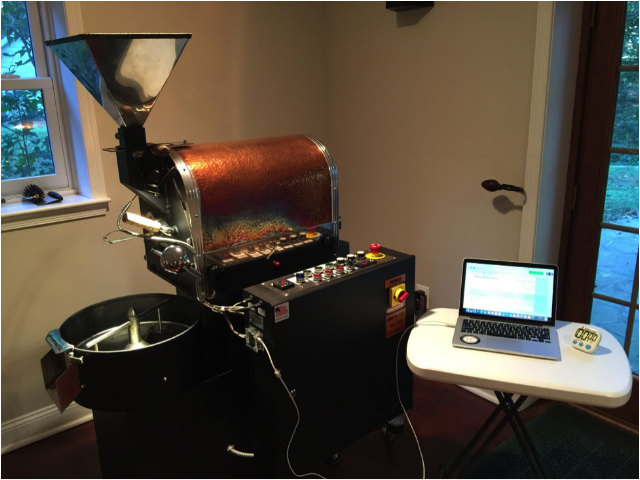
The photograph records another route into the application. In a 2016 account published by Frans Goddijn, Artisan user Mike Silver described connecting a US Roaster Corp 3 Kilo machine to his MacBook Pro through a Phidget 1048 interface. The drum roaster and laptop share a room, but the measurements pass through a specific, documented piece of hardware.[9]
The settings are part of what you see
A compelling feature is rate of rise: how quickly a recorded temperature changes. Artisan's Delta Span sets the time window used for its basic rate calculation. Increasing that span smooths the delta curve but can shift it in time. Other smoothing options affect the live and finished displays differently.[4]
The consequential distinction is between input filtering and later presentation. The documented input limits and spike rejection operate before readings are recorded; discarded readings cannot be recovered from the saved profile. Other filters work on recorded data and can be changed afterward. The documentation also warns that another user may see a different rendering of the same .alog file because their filter settings differ.[4]
A smooth line therefore needs an explanation: which readings survived, and how were they displayed? When sharing a profile for review, the project recommends sending the settings file as well.[4] That makes the conversation more precise. Two people can investigate the same batch without mistaking a display choice for a change in the roast.
Give the curve a batch to belong to
Artisan's Roast → Properties dialog collects the less photogenic information that makes a recording useful: operator, machine, product title, beans, and batch details. It also accommodates ambient information and separate roasting and cupping notes. Events and measurements appear in their own tabs, with table export available.[5]
Consider a small roastery comparing two batches that taste different. This is an illustrative use case, not a reported experiment. A profile with an identifiable coffee, an operator, and written observations provides several things to investigate. A nameless image of a curve provides far fewer. The file becomes useful when someone can connect the measurements to the particular coffee they tasted.
For repeating a batch, Roast → Background can load an earlier profile and align it to an event such as charge. A previous roast can sit behind the current one as a reference. The same documentation distinguishes Playback Aid, which presents event prompts, from Playback Events, which actually executes events.[6] Moving from a reference to automated action changes what the program does to the equipment; it deserves a separate decision.
For a one-person operation, naming and saving batches may be enough to begin building a useful history. A team sharing a machine also needs agreement on event labels, settings, and who updates them. Those are practical implications of a configurable recording system: consistency has to include the way the record is made.
Free software, with a business around it
Artisan's About page identifies the desktop application as AGPLv3 software and lists Windows, macOS, Linux, and Raspberry Pi among its supported platforms. It separately describes the paid artisan platform for inventory management and related business functions.[7] A roaster evaluating the project can therefore distinguish the application used beside the machine from the services used to organize a business.
Independent reporting supplies useful context for that arrangement. In August 2024, Daily Coffee News traced the first complete builds to 2010 and reported that the paid Artisan Plus service launched in 2019. Maintainer Marko Luther told the publication that funding the free application was a central motivation for the service.[8] This explains a business rationale; it is not a guarantee of future maintenance.
The 2026 Quick-Start Guide offers another sign of an application serving different kinds of users: Standard mode limits configuration choices, Expert exposes the fuller set, and Production hides configuration to concentrate on operating the software.[2] A long menu need not be the first thing a new operator learns.
Artisan's most useful promise is modest enough to test. Save a batch with its identity, events, settings, and tasting notes, then reopen it when there is a reason to compare. The application provides places for those observations to meet.[2][5] Whether the coffee is better remains a question for tasting; the software helps preserve what someone did so the next decision can be more informed.
Sources
- Artisan project, GitHub repository — application purpose, free commercial use, and release history including version 4.2.0, June 30, 2026.
- Artisan documentation, “Quick-Start Guide” — interface modes, device reading and recording, event markers, saved profiles, and settings.
- Artisan supported machines, “Hottop” — KN-8828B-2K+ communication, measurements, controls, and the explicit supervision requirement.
- Artisan documentation, “Curves,” updated June 4, 2025 — Delta Span, input filtering, display smoothing, and sharing profiles with settings.
- Artisan documentation, “Properties” — machine and batch information, ambient measurements, roasting and cupping notes, and recorded data.
- Artisan documentation, “Background” — reference-profile alignment and the distinction between playback prompts and event execution.
- Artisan project, “About” — desktop platforms, AGPLv3 licensing, contributors, and the separately described inventory service.
- Howard Bryman, “Artisan V3 Software Launches, Supporting Roastery Scheduling,” Daily Coffee News, August 14, 2024 — independent reporting on project history and the maintainer's account of the funding model.
- Frans Goddijn, “USR 3K roaster and Artisan setup,” Kostverlorenvaart, October 17, 2016 — Mike Silver’s firsthand hardware account and accompanying photograph.